
Gewudraw Printer Stand
4.7Editor score
Compact space-saving footprint
Supports up to 120 pounds
Quick 10-minute assembly
A cheap printer table can reclaim valuable desk space while giving your printer, scanner, and supplies a dedicated home. The best models combine a useful top surface, sturdy construction, convenient storage, and mobility that lets you move equipment when a room changes.
This guide compares ten printer stands across dimensions, shelf capacity, caster design, storage, charging options, materials, and intended uses. It includes compact models for tight rooms, larger stands for substantial printers, and carts with built-in power for flexible workspaces.
The selections reveal which options prioritize budget value, capacity, mobility, or useful extras. Product ratings and specifications reflect the supplied listings, while prices and availability can change, so compare current details before making your final purchase.
4.7Editor score
4.5Editor score
4.7Editor score
As an Amazon Associate we earn from qualifying purchases.
The table below compares all ten stands by their core design, storage, mobility, and capacity. Use it to identify the right footprint and features before reviewing the detailed individual assessments.





The YAOHUOO Large Printer Stand combines a spacious 22-by-15-inch platform with storage and mobility, earning a 4.5 rating. It is designed for users who want room for a substantial printer, scanner, fax machine, or 3D printer while keeping the device off the main work surface.
We may earn a commission when you buy through this link, at no additional cost to you.
Its two-tier arrangement gives the printer a dedicated home while leaving room below for paper and folders. A hidden drawer adds useful space for ink, pens, and smaller accessories without making the exterior look busy. The industrial-grade metal frame and waterproof MDF construction support up to 88 pounds per shelf.
The stand is 15.8 inches tall, making it low enough to slide beneath many desks. Four swivel casters, including two brakes, allow it to move between a workstation, closet, or meeting area. The listing also notes that the wheels can be exchanged for feet when a stationary setup is preferred.
This is the strongest all-around recommendation for buyers who need generous printer clearance, useful storage, and reliable movement. Choose it when the footprint beneath your desk is approximately 22 by 15 inches and your printer is large enough to benefit from the roomy surface. The trade-off is a bulkier cart than the smallest models in the guide, but the added storage and capacity justify that footprint for many offices.
The listing states that assembly takes about 15 minutes and uses pre-drilled, labeled parts without power tools. As with all stands, actual setup time depends on experience and the space available for assembly. No printer should be placed on the unit until the frame and shelves are fully tightened and stable.
The wide top is the centerpiece, but the drawer and open shelf make the stand useful beyond merely holding a printer. This balance makes it especially suitable for home offices that need paper, ink, and stationery organized in one movable unit.
Lockable swivel wheels make repositioning straightforward while helping keep the loaded cart steady during printing. Swapping in the included feet creates a fixed configuration when mobility is no longer needed.
We may earn a commission when you buy through this link, at no additional cost to you.
The HUANUO Printer Stand has a 4.5 rating and focuses on compact organization, cable management, and a storage drawer. Its 17.2-by-13.2-inch upper platform is intended for common home-office printers as well as paper and some 3D printers.
We may earn a commission when you buy through this link, at no additional cost to you.
The maximum listed height of 14.1 inches makes the stand a practical candidate for sliding beneath a desk, table, or counter. Its modular extension arrangement allows the user to assemble it at a shorter height. A divided drawer organizes office accessories, while the lower shelf accommodates paper, reference books, files, and folders.
The stand supports up to 38.5 pounds, less than many larger models in this roundup. That limitation makes it better suited to typical home printers than to a large office copier or a collection of heavy equipment. The optional casters provide mobility, but the listing warns against moving the stand while the printer or other objects are on it.
This model is a sensible pick for a small apartment or home office where under-desk clearance matters more than heavy-duty capacity. Choose it if the printer and supplies fit comfortably on the top and lower shelf and you want a drawer to contain small accessories. It may be less suitable for users who regularly roll a loaded workstation.
The supplied information notes that the stackable design allows quick, tool-free assembly. Confirm the final assembled height and your available clearance before ordering, because the adjustable construction can create several possible configurations rather than one fixed overall dimension.
The adjustable maximum height gives buyers some control over clearance beneath desks and counters. This makes the stand more accommodating in compact rooms where a conventional printer table would remain permanently exposed.
Divider-equipped drawers are valuable for pens, adapters, ink accessories, and other small items. They help prevent loose supplies from disappearing behind a larger printer while making the cart more useful day to day.
We may earn a commission when you buy through this link, at no additional cost to you.
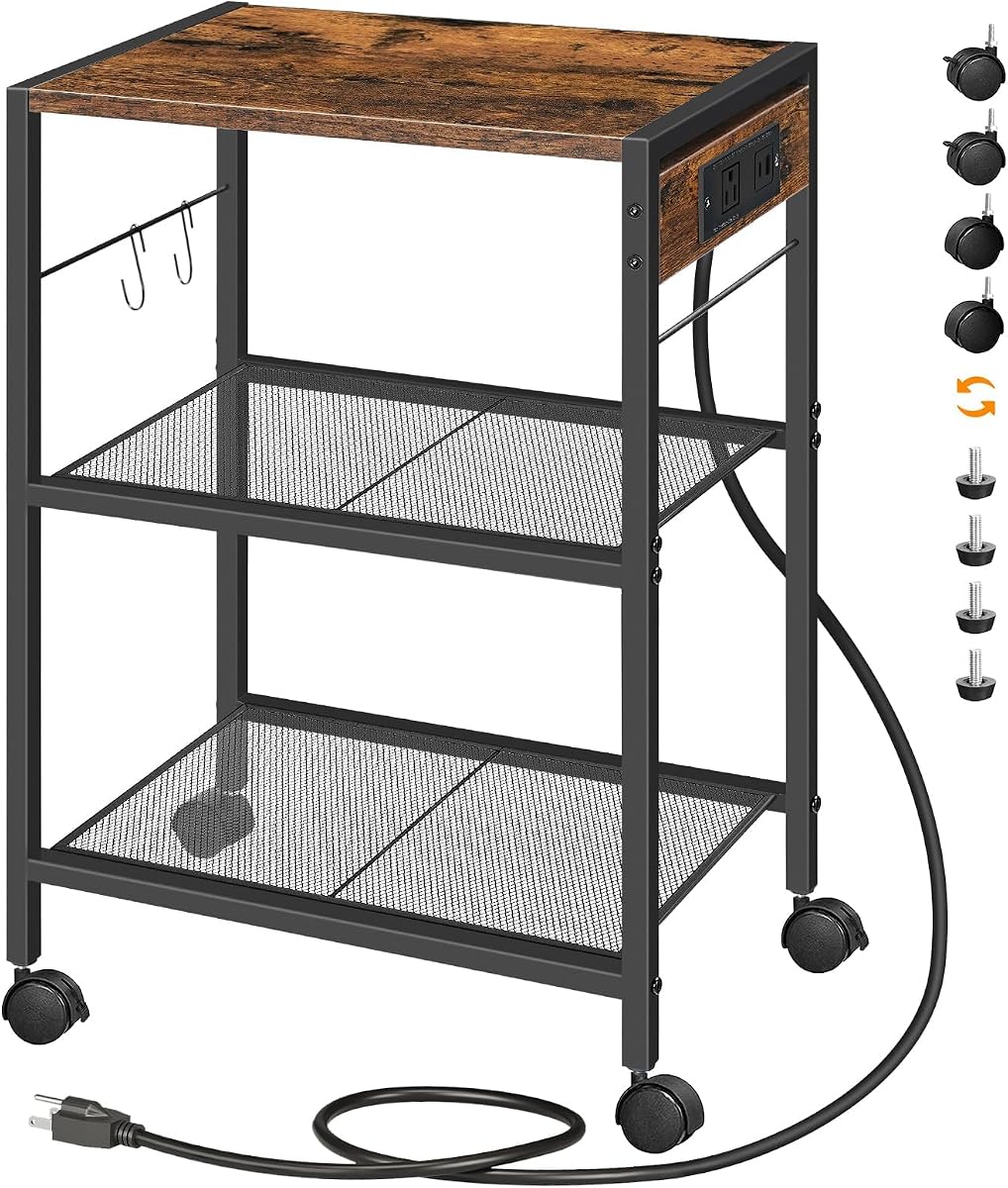
The HOOBRO Industrial Printer Stand earns a 4.4 rating by combining three-level storage with a built-in charging station. Its rustic-brown finish and mixed wood-and-metal construction are intended to blend into offices, living rooms, and other multipurpose spaces.
We may earn a commission when you buy through this link, at no additional cost to you.
The top provides space for a printer, while two mesh shelves organize scanners, copiers, laser printers, books, plants, and other supplies. The charging arrangement includes a standard outlet and four USB ports, allowing several small devices to charge without relying exclusively on a nearby wall socket.
The top plate supports up to 44 pounds, and each mesh shelf is rated for 17 pounds. Buyers can choose four casters, two of which have brakes, or four adjustable feet for uneven floors. An anti-tip device is not listed for this model, so the heavier upper tier deserves particular care during movement.
This is a good option for users who want one mobile station to handle printing, charging, and general storage. It stands out when easy access to USB charging matters more than a closed or concealed design. The open mesh shelves keep the cart visually light and make contents easy to reach.
The outlet and USB ports add convenience, although the listing notes that power may be insufficient for every charging need. Check device requirements and avoid using the charging features as a substitute for proper printer power management. Numbered accessories, instructions, and tools support assembly, though buyers should still allow time to connect the components correctly.
Built-in charging is especially helpful in shared rooms where wall outlets are scarce or inconvenient. It reduces cable clutter around the cart while keeping compatible devices close to the workspace.
Three levels allow printers and supplies to be separated instead of stacked in a crowded pile. Mesh construction reduces visual bulk and makes it straightforward to identify what has been stored.
We may earn a commission when you buy through this link, at no additional cost to you.
The Asgolion Printer Table has a 3.9 rating and offers a compact two-tier format that can slide beneath a desk. Its 15-by-11-inch upper surface is designed for a range of inkjet, laser, photo, and all-in-one home printers.
We may earn a commission when you buy through this link, at no additional cost to you.
Four casters swivel through 360 degrees, and two include locks for holding the stand in its chosen position. The solid MDF board and metal frame create a simple frame-and-shelf structure, while smooth surfaces are designed for straightforward cleaning and maintenance.
The stand can function as a printer cart, kitchen shelf, sofa-side table, bedside table, nightstand, or craft-room organizer. That versatility makes it appealing for buyers who want one piece of furniture to serve several purposes rather than a dedicated industrial-looking office accessory.
Choose this model when your printer fits within the compact platform and your main goal is flexible placement. It is less compelling for a large printer or heavy office equipment because no numerical load capacity is provided in the supplied listing. The lower rating also makes careful review of current customer feedback advisable.
Assembly tools and step-by-step instructions are included. Because the footprint is modest, buyers should measure both the printer base and the available under-desk clearance before ordering. Checking those dimensions can prevent the inconvenience of discovering that the printer overhangs the top or that the casters catch on the desk frame.
The small top and low overall height target workspaces where every inch of desk clearance matters. It also provides enough lower-shelf space for a modest supply of paper and accessories without occupying a large floor footprint.
Because the casters make repositioning easy, the table can move from a home office to a living room or craft area. That flexibility gives the product broader utility than a fixed printer stand.
We may earn a commission when you buy through this link, at no additional cost to you.
The VENNQD Large Printer Stand combines a broad 23.6-by-15.7-inch top with two fabric drawers and open shelving. Its 4.4 rating reflects a design that is especially useful for scanners, fax machines, printers, and office supplies that need generous clearance.
We may earn a commission when you buy through this link, at no additional cost to you.
The iron frame and engineered wood shelves support up to 70 pounds per tier. Two pull-out fabric drawers provide private storage for smaller items, while open shelves hold paper, ink cartridges, folders, or stationery. This arrangement creates more organized storage than a simple two-shelf cart.
Four rotating casters allow movement within a workspace, and two wheels can lock for stability. Adjustable feet are also included, giving buyers a way to level the stand on uneven surfaces or use it as a fixed unit. Water-resistant surfaces help simplify cleanup around office equipment.
This model suits buyers who want large printer clearance and discreet storage in a coordinated white design. It is particularly useful when the cart will remain visible in a home office and open shelves alone would look untidy. The two-drawer configuration also helps separate private or easily misplaced accessories.
The trade-off is its larger footprint and taller profile compared with compact printer stands. Fabric drawers may also deform less rigidly than wood under heavy loads, so they are best reserved for stationery, cables, and smaller supplies. The listing states that assembly instructions are included and that the wood used in the desktop and drawers is FSC certified.
The wide top provides substantial room around printers and scanners that may overhang smaller platforms. This extra clearance can also make it easier to reach paper trays, control panels, and output areas.
Two fabric pull-out drawers turn otherwise loose office items into a dedicated storage zone. They are especially helpful for keeping ink, adapters, pens, and replacement cartridges together.
We may earn a commission when you buy through this link, at no additional cost to you.
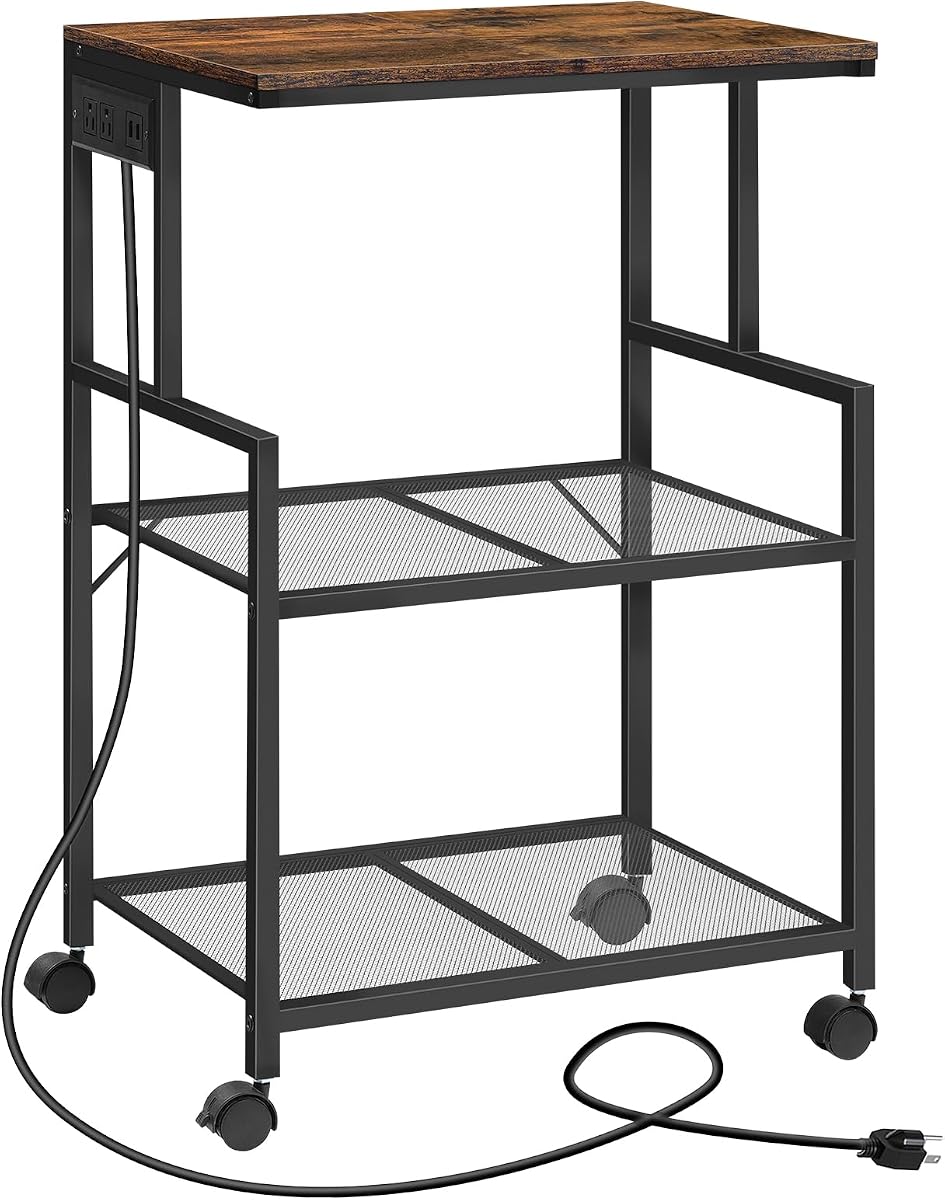
The MAHANCRIS Mobile Printer Stand offers three open tiers, built-in charging, and a 4.3 rating. At 20.5 by 15.7 inches and 32.1 inches tall, it is positioned more like an industrial rolling rack than a low under-desk table.
We may earn a commission when you buy through this link, at no additional cost to you.
The top tier and each mesh shelf support up to 44 pounds. This rating gives the stand more authority than several compact options, while the three-level structure separates the printer from paper, books, collectibles, or kitchen equipment. A built-in power strip includes two standard outlets and two USB ports.
Four caster wheels rotate through 360 degrees, and two are lockable to prevent unwanted movement. The listed anti-tip device adds another layer of stability, which is helpful with a tall three-tier frame. A 4.9-foot power cord is intended to make the charging station easier to reach.
Choose this cart for a spacious office, studio, or multipurpose room where vertical storage matters. It can also function as a bookshelf, baker's rack, or kitchen organizer. The open construction makes contents accessible but does not hide visual clutter, so baskets or coordinated storage containers may be necessary in a visible living space.
The main limitation is height: at 32.1 inches, it cannot function as a low under-desk printer stand. Its broad footprint also requires more floor space than compact models. Nevertheless, for buyers who need three substantial tiers and charging in one mobile unit, the listed capacities and security features create a clear advantage.
A 44-pound rating across the top and mesh shelves gives the cart more versatility than stands designed mainly for lightweight printers. It can separate office equipment from books or other organized contents.
The undershelf power strip offers outlets and USB ports close to the equipment. This reduces dependence on distant wall sockets and helps consolidate charging cables.
We may earn a commission when you buy through this link, at no additional cost to you.
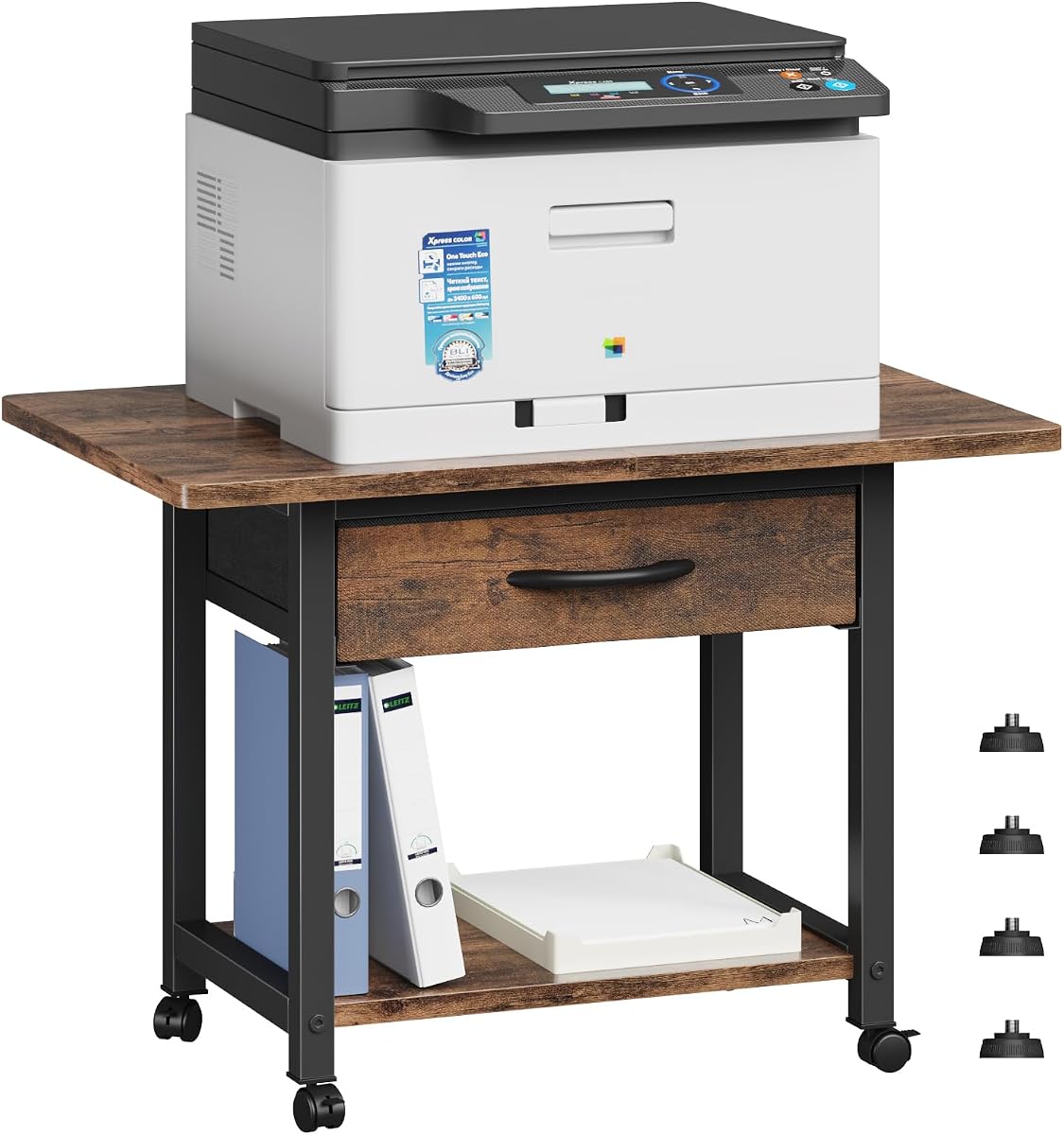
The Gewudraw Printer Stand combines a compact profile with a 4.7 rating, making it a notable budget-oriented option. Its 15.35-by-11.02-inch top and 11.88-inch height fit neatly on countertops, inside cabinets, or in tight corners.
We may earn a commission when you buy through this link, at no additional cost to you.
The steel frame and scratch-resistant MDF board support up to 120 pounds. That stated rating exceeds those of several larger stands and allows the unit to hold most home and office printers. Four adjustable, non-scratch feet provide stability on uneven surfaces while helping protect furniture underneath.
The stand can serve as a printer table, laptop riser, bookcase, storage shelf, plant holder, spice rack, or vanity organizer. Its rustic wood-grain finish and matte black frame give it a decorative appearance, although open storage means the unit may function better as a side table than as a fully tidy office cabinet.
This is a strong budget pick for buyers who want useful capacity without paying for powered charging, wheels, or multiple drawers. It suits compact spaces and can sit under a desk when the printer allows. The absence of casters makes it less convenient for frequent relocation, but the feet provide a stable, scratch-friendly configuration.
The listing describes assembly as a quick 10-minute process with an instruction manual and necessary tools included. As with any compact stand, measure the printer's base and verify clearance before assembly. Its strongest selling points are the small footprint, high stated load capacity, and ability to blend into several types of rooms.
The 120-pound rating is unusually strong for a stand this small. It makes the model practical for a printer while leaving room for a modest stack of books or supplies.
The wood-grain surface and matte black frame are intended to blend with home-office and living-room furniture. Adjustable non-scratch feet help maintain that appearance by protecting the surface beneath.
We may earn a commission when you buy through this link, at no additional cost to you.
The CHOEZON 23.6-inch Printer Stand has a 4.7 rating and emphasizes a wide top, flexible placement, and structural support. Its 23.6-by-15-inch upper panel is designed to accommodate most home printers while leaving room around the machine.
We may earn a commission when you buy through this link, at no additional cost to you.
The top shelf supports up to 88 pounds, and a lower shelf provides room for another printer or paper storage. Side X-cross supports contribute to the stand's rigidity, while the combination of particleboard and metal frame creates a practical industrial-style structure.
Buyers can install four casters or four adjustable feet. Two of the casters have brakes, providing both mobility and the ability to secure the stand. Including both options makes the unit appropriate for spaces where it must move during cleanup but remain stable during normal use.
Choose this model when printer width is the main concern and open storage fits your organization style. The broad top can accommodate equipment that would overhang the narrower models in this guide. It can also serve as a general shelf for books, plants, scanners, copiers, and office supplies.
The main compromise is the absence of drawers or charging features. Supplies stored on the open shelf remain visible, and the wide footprint demands enough clear space for movement. Numbered parts, instructions, and tools are included, helping simplify the straightforward assembly process.
The extended top gives large printers more lateral room than compact stands. That clearance can reduce the likelihood of overhang and makes access to trays and controls more comfortable.
Braked casters make frequent repositioning possible, while adjustable feet are better for a permanent location or uneven floor. Providing both options improves versatility without changing the core frame.
We may earn a commission when you buy through this link, at no additional cost to you.
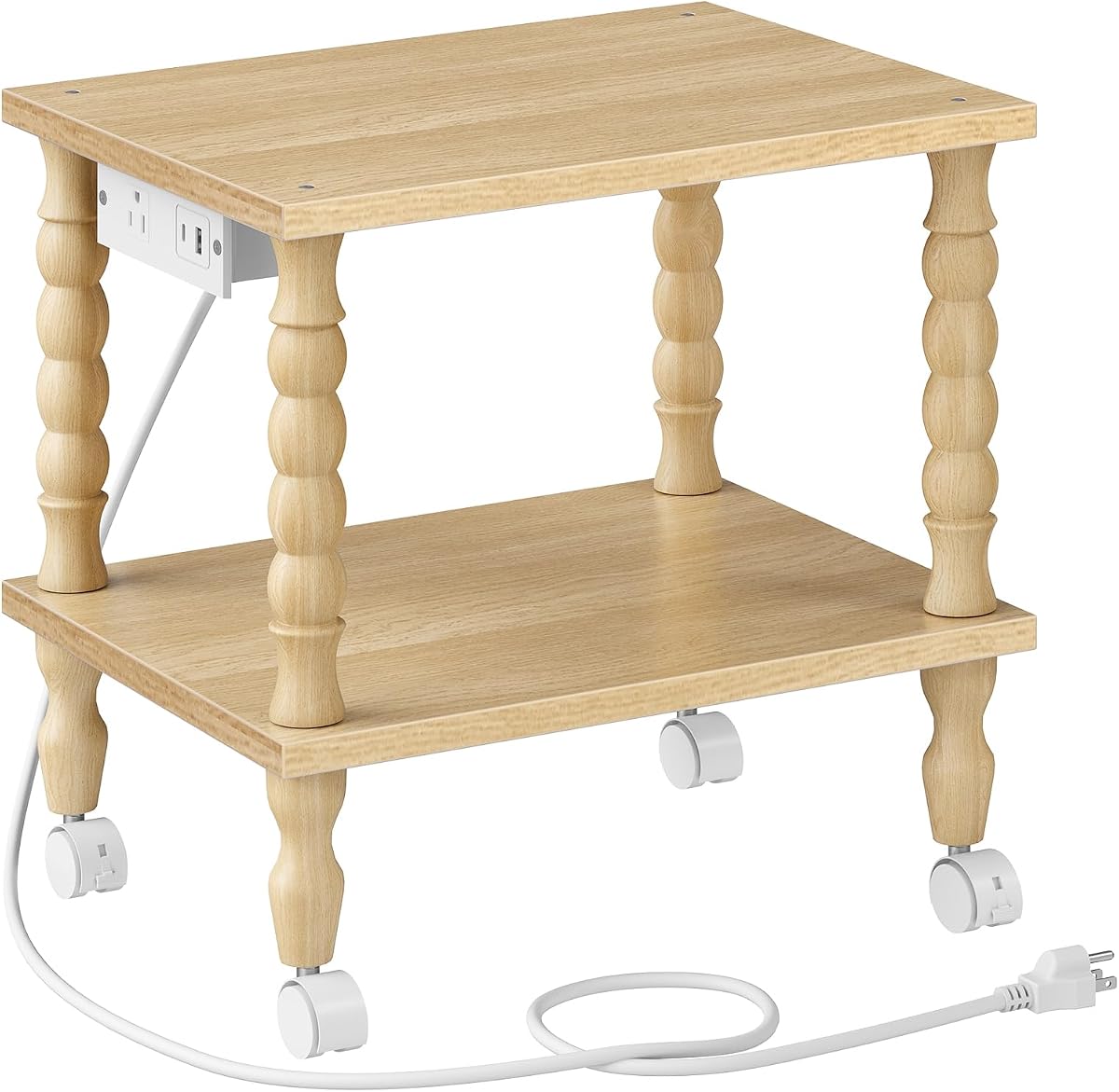
The HOOBRO 2-Tier Printer Stand with Solid Wood Legs offers a more decorative approach to printer storage. Its 4.7 rating, natural finish, and classic Roman-style rubberwood legs make it especially suitable for visible areas of a home office or living room.
We may earn a commission when you buy through this link, at no additional cost to you.
A built-in charging station includes one AC plug, one USB-A port, and one Type-C port. This lets compatible phones, tablets, and other devices charge near the printer without requiring a separate charging hub on the desk. It is one of the most feature-focused compact stands in the selection.
The 15-by-11-inch footprint and 15-inch height remain compact enough for placement under a desk or beside a sofa. Each shelf supports up to 44 pounds, while the 12-millimeter-thick particleboard provides the main horizontal structure. The rubberwood legs add a warm appearance that distinguishes the stand from industrial mesh designs.
Choose this model for buyers who care about appearance as much as utility. The built-in charging and attractive legs justify its premium-oriented place in the guide for a shopper seeking a compact stand that can remain on display. It is less suitable for very wide printers or users who need numerous enclosed storage compartments.
Bottom casters allow movement, while leveling feet can be used for a fixed setup. Parts are labeled, the manual presents the steps, and tools are included. Because the charging station requires power, buyers should also consider cable routing and access to a nearby wall outlet when choosing its final position.
AC, USB-A, and Type-C connections cover several common charging needs without taking up desk space. Keeping these ports on the stand makes it a useful central point for a smaller workstation.
The natural rubberwood legs give the stand a furniture-like appearance that suits living rooms and styled offices. That finish makes it less industrial in feel than stands built entirely from metal and particleboard.
We may earn a commission when you buy through this link, at no additional cost to you.
The VASAGLE 2-Tier Printer Stand pairs a 4.7 rating with a spacious top and a notably high 99-pound load rating. Its 18.9-by-15.7-inch platform is designed for most inkjet printers or fax machines and can slide beneath a suitable desk.
We may earn a commission when you buy through this link, at no additional cost to you.
A lower open shelf adds space for paper reams, ink cartridges, folders, and other supplies. The top is rated for 99 pounds, while the lower shelf supports 33 pounds. That difference makes the upper platform the better location for the printer and the lower level more appropriate for paper and lighter accessories.
Four sturdy wheels make the stand mobile, and two lock in position to reduce movement. The steel frame and particleboard construction provide a stable base for frequent use. This configuration is well suited to users who want to roll the printer into view for a job and then secure it under the desk afterward.
Choose this model for a home office with moderate floor space and a printer that benefits from a broad top. It is especially attractive for users who value a high stated top capacity without moving into a tall three-tier industrial rack. Its open storage is easy to access but does not conceal supplies.
The listing mentions clear instructions and an included Allen key, reducing the need for additional tools. Buyers should still check under-desk clearance, including the height needed for the printer itself, and account for the depth of its paper tray. Locking the wheels before operating the printer helps maintain a stable setup.
The 99-pound top rating comfortably accommodates a printer plus reasonable working weight. It also provides useful margin for a scanner or other equipment without requiring a full-height rack.
The mobile format makes it easy to clear desk space when the printer is not needed. Two locking wheels then keep the stand steady during printing and paper handling.
We may earn a commission when you buy through this link, at no additional cost to you.
Choosing a printer table involves balancing printer dimensions, available clearance, storage needs, weight limits, mobility, and appearance. The most affordable option is not necessarily the most useful one if it cannot hold your equipment safely or fit where you need it.
Begin with the printer's footprint rather than its marketing category. Measure the width, depth, and height of the unit with its output tray and paper guides in their usual positions. Also measure the area beneath your desk, including any crossbars, drawer rails, wall outlets, and chair-clearance zones. A stand may advertise a generous top surface while still being too tall for the available space.
Match the printer base to the platform with a little clearance around exposed edges. For under-desk use, check both the listed dimensions and any included feet or casters, since the installed configuration may affect overall height. Large printers and all-in-one machines generally benefit from the 18.9-to-23.6-inch-wide tops in this guide.
Choose a platform that fully supports the printer and leaves room for cables and paper handling.
Height is the factor most likely to determine whether a printer stand can slide under a desk. The models here range from compact stands around 11.88 inches tall to a full-height rack listed at 32.1 inches. Measure the opening beneath the desk from floor to lowest obstruction, then subtract a little clearance so the cart can be moved into position without scraping.
Remember that the printer itself may be taller than the stand. If the equipment must remain in use while partially tucked away, verify that its display, lid, rear feed area, and paper tray remain accessible. Adjustable-height or modular designs can provide more placement flexibility, but their final height should be checked after assembly.
Choose the shortest stand that supports your equipment, and confirm clearance for the caster or foot configuration you plan to use.
A listed capacity is useful only if it comfortably exceeds the combined weight of the printer, paper stacks, accessories, and anything stored below. Some listings specify capacity per shelf, while others describe an overall figure. These are not interchangeable, so compare products using the same basis before deciding which model is stronger.
Capacity also affects long-term durability. A stand with a generous margin is less likely to feel strained when the printer sends a heavy paper tray outward or when the lower shelf is filled with reams. The YAOHUOO, CHOEZON, and MAHANCRIS models list 88-, 88-, and 44-pound capacities respectively across their shelf structures, while the Gewudraw stand has a 120-pound overall rating.
Choose a published capacity with comfortable headroom above the expected load rather than matching the printer weight exactly.
Storage requirements depend on whether you mainly need paper access, concealed small-item organization, or display space. Open shelves keep paper and folders visible and easy to retrieve, but they can look untidy in a living room. Drawers are better for pens, adapters, ink accessories, and other items that should remain together but do not need constant visibility.
The HUANUO stand includes a divided drawer, while the VENNQD model provides two fabric pull-out drawers. Larger models generally use open shelves, which can be supplemented with labeled bins. Consider how you will refill paper: a wide lower shelf is useful for unopened reams, while a shallower compartment is better for files and accessories.
Choose drawers for clutter control and open shelving for quick paper access, especially when the cart remains visible in a shared room.
Wheels are valuable when a printer must move between a desk, closet, and shared workspace. Look for 360-degree swivel movement and at least two brakes so you can position the stand and keep it from drifting. Models that include both casters and adjustable feet offer more placement flexibility because you can switch between a mobile and a fixed setup.
Consider the loaded weight as well as the wheel count. Tall three-tier carts need especially stable casters and careful movement, and some manufacturers warn against rolling a stand while equipment is being placed on it. Lock the brakes before operating the printer, opening drawers, or retrieving paper so the cart remains steady.
Choose locking casters for frequent movement, and include adjustable feet if uneven flooring or permanent positioning is important.
Built-in charging can turn a basic printer stand into a compact utility station. The HOOBRO models include outlet and USB options, while the newer solid-wood model adds USB-A and Type-C connectivity. These features are useful when wall outlets are limited, but they do not eliminate the need to plan cable routes or check electrical capacity.
For setups without charging, cable management matters just as much. Keep the printer cable within reach of the stand and avoid creating a trip path between the cart and the wall. Drawers can conceal adapters and small power bricks, while open shelves make routing more visible. Always follow the printer manufacturer's power and ventilation guidance.
Choose integrated charging when convenient device power is a priority, and verify that the included ports match your devices.
Metal frames add structural strength, while MDF, particleboard, or engineered wood panels create the shelves. Water-resistant surfaces are helpful because printer dust, toner, and small spills can occur. Decorative finishes and solid wood legs matter more when the stand will be visible in a living room or styled office.
Check whether tools are included and whether assembly needs power tools. The products range from quick tool-free configurations to assemblies with labeled parts and included hand tools. Build the stand where it will be used, especially if the final location is under a desk or against furniture that makes assembly difficult.
Choose a finish that suits the room, and favor straightforward assembly when the stand must be assembled in a confined space.
Many printer stands are designed as multipurpose furniture. They can become compact bookshelves, kitchen racks, bedside tables, plant stands, spice organizers, or laptop risers. A versatile design may offer better overall value if it replaces another small piece of furniture as well as organizing the printer.
Look for a style and footprint that make the secondary use practical. A decorative compact model may look natural beside a sofa, while a tall industrial cart is better suited to a garage-style office or storage area. Confirm that any alternative use does not exceed the stated capacity or place combustible items near power supplies.
Choose a multipurpose stand when its finish, size, and load rating suit the second role as well as the printer.
Before assembly, move the stand to the intended area and check the floor, wall clearance, desk supports, and nearby outlets. Confirm that the printer fits the top and that the assembled height leaves enough room for the paper tray, scanner lid, controls, and ventilation. Assemble the frame on a level surface, tighten all fasteners, and install the preferred casters or feet only after the structure is secure.
Place the printer centrally on the top and distribute heavier supplies across the lower shelf rather than concentrating them at one edge. Keep paper reams and frequently used accessories within easy reach, but do not overload any tier beyond its stated rating. Route printer and charging cables along the back or underside of the stand, avoiding loops that could interfere with the casters.
For routine care, wipe the surfaces with a soft, slightly damp cloth and dry them promptly. Clean the casters if dust or hair affects rolling, and periodically check that screws remain tight. Before moving a loaded stand, secure the printer, close drawers, and lock the wheels when it reaches its new position. Use the feet instead if the stand should remain fixed on an uneven floor.
Choose a top that fully supports your printer's base and fits beneath the desk with room for the output tray and controls. Measure the printer, the lowest desk obstruction, and the available floor area before ordering. A model with adjustable height or interchangeable feet can provide extra flexibility when clearance is limited.
Yes, provided the stand's dimensions and stated weight capacity cover the printer and any stacked paper or accessories. Models with tops between 22 and 23.6 inches wide are generally better candidates for larger all-in-one units. Always check the printer manufacturer's size and weight information before placement.
A three-tier stand is useful when you need to separate printers, scanners, paper, books, and other supplies. It also offers more total storage, but it is usually taller, takes more floor space, and may be less suitable beneath a desk. A two-tier model is often easier to manage in a compact home office.
Locking wheels are strongly beneficial because they prevent the loaded stand from drifting while the printer is operating. Look for at least two brakes and make sure they engage fully on your floor. Adjustable feet are a better choice when the cart will stay in one location permanently.
USB ports on the stands in this guide are intended for compatible devices, while the standard outlets can power appropriate equipment within the power strip's limits. Check each product's port types and electrical specifications. Always use manufacturer-approved cables and chargers, and do not treat the stand as a substitute for a surge protector.
Fabric drawers are best suited to small accessories, stationery, cables, adapters, and boxed ink rather than very heavy equipment. Check the drawer construction and load guidance when available. Heavy paper stacks and printers belong on the designated shelves, where their weight is better distributed.
Leave enough room to lift the scanner lid, open output trays, access controls, and remove paper jams. Also follow the printer manufacturer's ventilation guidance and keep cords out of the way. Measure the machine in operation rather than relying only on the width and depth of its body.
Engage the wheel brakes and place the stand on a level, stable surface before starting the printer. Avoid leaning against the cart or repeatedly pulling paper trays, as these actions can shift or tip the stand. For frequent use in one location, leveling feet can provide even greater stability.
The YAOHUOO Large Printer Stand is the most balanced overall choice because it combines a wide top, a drawer, lower-shelf storage, strong shelf ratings, and locking casters. The Gewudraw stand stands out as a compact budget option with a high stated load rating, while the HOOBRO Solid Wood Stand earns the premium selection for its decorative legs and integrated charging.
Prioritize the dimensions and weight rating before any secondary feature. Confirm that the printer fits, the assembled unit clears the desk, and the intended shelf can support the load. Then choose storage, mobility, and charging according to your workspace: drawers for clutter, casters for changing rooms, and power ports for shared charging needs.
Ratings, specifications, prices, and availability can change over time, so review the current listing before ordering. Confirm the latest dimensions, included accessories, load ratings, and compatibility with your printer. That final check helps turn a low-cost organizer into a dependable part of the workspace.