Liene White M200
4.5Editor score
Rechargeable dye-sublimation printing
Forty prints per charge
Built-in Wi-Fi hotspot
Battery powered portable printers bring practical printing capability to offices, classrooms, vehicles, travel kits, and remote workspaces. A useful model balances battery capability, wireless connectivity, paper handling, image quality, and the ability to produce the documents or photos you actually need.
The products in this guide range from compact inkless thermal printers to rechargeable color inkjets and a dedicated 4-by-6-inch photo printer. We compared their stated connectivity, supported media, printing technologies, portability, included accessories, and practical features rather than treating every printer as a general-purpose solution.
Each review identifies the use cases that best suit the selected model and explains the compromises involved. The top three picks cover business printing, full-color photos, and lightweight document output. Product availability, included accessories, features, and prices can change, so verify current listings before purchasing.
4.5Editor score

4.1Editor score

4.2Editor score
As an Amazon Associate we earn from qualifying purchases.
This side-by-side overview compares the ten printers by print technology, power source, connectivity, paper support, portability, and their most appropriate uses, helping distinguish compact thermal models from rechargeable color inkjets and photo printers.



The Canon PIXMA TR160 is a compact wireless color inkjet rated 4.2 out of 5. It is designed for users who want sharp text, colorful documents, and small photo output from a printer that can fit comfortably in a bag or backpack. Its defining strength is the combination of a five-color hybrid ink system, borderless printing, and several convenient connection methods.
We may earn a commission when you buy through this link, at no additional cost to you.
The printer supports Canon PRINT, Apple AirPrint, and Mopria Print Service, while Wireless Direct Mode can establish a connection without relying on a wireless router. That flexibility is useful in hotels, temporary offices, classrooms, and locations where conventional Wi-Fi may be unavailable. The 1.44-inch monochrome OLED provides quick access to ink status and other settings without requiring a computer.
Its most important limitation in this battery-powered roundup is that the supplied specifications do not identify an internal rechargeable battery. It is portable in size and wireless in operation, but it is not presented as a self-contained battery-powered printer. Users planning to work far from an outlet should treat the TR160 as a compact wireless printer rather than a genuinely untethered printing solution.
This is a sensible choice for travelers, students, and home users who value color quality, modest size, and easy wireless setup more than complete independence from power. It also suits people who need square or borderless prints in addition to ordinary documents. For mobile business users who must print away from an outlet, however, a model with a documented rechargeable battery would be a more logical purchase.
The five-color hybrid ink system is intended to produce sharp black text and vibrant color details on documents and photos. Support for square and borderless formats also gives it more creative flexibility than a basic portable document printer.
Canon PRINT, AirPrint, Mopria, and direct wireless access make the TR160 approachable across major mobile platforms. Direct Mode is particularly helpful when there is no router, although an available power source is still necessary.
We may earn a commission when you buy through this link, at no additional cost to you.
The HP OfficeJet 250 is a wireless mobile all-in-one rated 4.3 out of 5. It stands out because it does more than print: scanning and copying are built into a body that can fit into a car, backpack, or briefcase. A battery is included, making it one of the clearest choices for business users who need a genuinely portable office.
We may earn a commission when you buy through this link, at no additional cost to you.
The HP app provides mobile print and scan control, while HP Auto Wireless Connect simplifies setup and allows printing with or without a router. HP Fast Charge is claimed to recharge the unit within 90 minutes while it is off. Original HP 62 series cartridges are used, and the broad paper support includes letter, legal, statement, executive, several card and photo sizes, and common envelopes.
The trade-off is that this is an older-style mobile inkjet, not a modern all-in-one built around an exceptionally thin chassis. Inkjet cartridges are inherently consumed, and the unit is likely to be bulkier than thermal-only models. Buyers should also account for the need to maintain Original HP 62 cartridge availability and should verify mobile app compatibility with their current devices before ordering.
The OfficeJet 250 is best suited to mobile professionals, field workers, real-estate agents, and consultants who need printing, scanning, and copying in the same compact device. It is also a stronger fit than a dedicated thermal printer for users who need envelopes, photos, or more conventional office media. For that broad mobile-office requirement, it earns the Editor's Choice distinction in this guide.
The combination of printing, scanning, and copying removes the need to carry several separate devices. It is especially valuable for paperwork-heavy users who need to send signed records, make copies, or digitize documents while away from a fixed office.
HP Auto Wireless Connect makes direct mobile use straightforward, while the included battery provides freedom from wall outlets. This combination suits fieldwork, travel, temporary workspaces, and shared vehicles.
We may earn a commission when you buy through this link, at no additional cost to you.
The HP OfficeJet 200 is rated 4.4 out of 5, making it the highest-rated conventional portable inkjet in this group. It offers a focused solution for users who need color documents and photos but do not require scanning or copying. Its compact body, included battery, and wireless setup capabilities make it well aligned with mobile work.
We may earn a commission when you buy through this link, at no additional cost to you.
The printer can be controlled from a smartphone through the HP app, and HP Auto Wireless Connect supports straightforward setup with or without a wireless router. The claimed 90-minute fast charge is useful for a device that may spend the day in a car or travel bag. Original HP 62 cartridges, a one-year limited hardware warranty, and support for letter, legal, statement, executive, cards, photos, and envelopes round out the package.
Compared with the OfficeJet 250, the model omits scanning and copying. That limitation is easy to understand if your needs are strictly print-oriented, but it reduces versatility for administrators, notaries, and anyone who regularly digitizes paperwork. Like other inkjets, it also requires ongoing cartridge replacement, and its mobile design may not match the paper capacity of a full-size desktop printer.
Choose the OfficeJet 200 for a highly portable business-printing setup that handles both documents and conventional photo sizes. It is a particularly good fit when a router is unavailable or when users alternate among a laptop, tablet, and smartphone. If scanning is important, move up to the OfficeJet 250; otherwise, this model delivers the most compact path to full-color mobile output.
The OfficeJet 200 keeps its feature set focused on printing while retaining color capability and support for many common media sizes. It is a sensible alternative for mobile users who do not need a scanner or copier.
The included battery and fast-charge capability support printing during commutes, appointments, and field visits. Users can charge at home, in a car, or at an office before taking the printer on the road.
We may earn a commission when you buy through this link, at no additional cost to you.
The Epson Workforce WF-110 is a wireless color mobile inkjet rated 4.1 out of 5. Its strongest feature is explicit battery independence: a built-in rechargeable lithium-ion battery lets the printer operate away from an outlet, while optional external battery support can increase capacity for extended assignments.
We may earn a commission when you buy through this link, at no additional cost to you.
The charging system is flexible. Users can charge through USB, use an AC adapter, or operate the printer on AC power when appropriate. Wireless connectivity and Wi-Fi Direct support printing from compatible iPads, iPhones, tablets, smartphones, and laptops. That mix of interfaces provides a good balance for people who alternate between a personal phone and a work computer.
Epson states that its printing system is designed exclusively for Epson Genuine Cartridges and warns that non-genuine ink could cause damage not covered by the limited warranty. This makes cartridge planning important for cost-conscious users, especially if the printer will handle high page volumes. Its 4.1 rating is also the lowest among the color inkjets in the list, so buyers should consider real-world reviews and current device compatibility before finalizing a choice.
The WF-110 is best for mobile professionals and students who require actual color documents without tethering the printer to mains power. It is especially compelling for users who can plan around genuine Epson supplies and want direct wireless access from several device types. Those priorities, together with the optional external battery, make it a well-rounded portable office choice.
The built-in lithium-ion battery makes this a practical option for appointments, site visits, and travel. An optional external battery extends the operating window when a full day away from power is expected.
Wi-Fi Direct and standard wireless connectivity support a broad selection of phones, tablets, and laptops. Users can work from whichever device carries the document they need to print.
We may earn a commission when you buy through this link, at no additional cost to you.
The Gloryang Inkless Portable Printer is rated 4.2 out of 5 and is packaged as a ready-to-use travel printing kit. It uses direct thermal technology, so it needs no ink, toner, or ribbon, and the package includes the printer, a carrying case, a charging cable, three thermal paper rolls, a manual, and a guide card.
We may earn a commission when you buy through this link, at no additional cost to you.
Bluetooth connectivity through the Jadens Printer app allows use with iOS and Android devices. It can also serve laptops and computers after the appropriate driver is installed. At approximately 1.75 pounds and 1.7 inches thick, it can fit into a backpack or briefcase without consuming excessive space. The built-in paper bin helps keep rolls organized, while two loading methods and support for documents from 2 to 8.5 inches provide practical flexibility.
The central constraint is paper compatibility. Gloryang explicitly states that the printer is compatible only with its thermal paper and cannot use regular, plain, or inkjet paper. Thermal output is appropriate for contracts, forms, travel records, and text-oriented material, but it does not reproduce ordinary paper in the same way a conventional inkjet would. Buyers should also verify app and driver support for their specific computer before relying on the non-mobile workflow.
This is a strong choice for travelers, students, and mobile workers who want a complete document-printing bundle rather than a bare device. It works particularly well as an emergency-printing option for receipts, notes, itineraries, and simplified contracts. Its included case and paper make preparation easier, while the inkless mechanism simplifies routine use. It is the Best Budget choice for travel-oriented document printing.
A protective case and three rolls of compatible paper are included, removing much of the guesswork from first-time setup. The low-profile body and modest weight also make the printer easy to pack.
Direct thermal technology eliminates ink cartridges and ribbons. It is a practical approach for monochrome travel documents when users understand that only specially compatible thermal paper can be loaded.
We may earn a commission when you buy through this link, at no additional cost to you.
The A285M Inkless Thermal Printer is rated 4.0 out of 5 and prioritizes flexible paper handling in a small travel-oriented body. At about 1.5 pounds, it is intended for backpacks and briefcases, with suggested uses ranging from business travel and construction sites to classrooms, homes, and small offices.
We may earn a commission when you buy through this link, at no additional cost to you.
Its strongest feature is support for five thermal paper widths: US Letter, A4, 4.33-inch, 3.14-inch, and 2.08-inch formats. The built-in paper bin accepts continuous and single-sheet thermal paper, giving users more options than the simplest label-style devices. Bluetooth works with iPhones, Android phones, iPads, and tablets, while USB-C provides a wired laptop and computer route after driver installation.
As with other thermal-only devices, output is black and white, and regular copy paper cannot be used. That makes the A285M unsuitable for full-color projects, photographs, or jobs where ordinary office paper is mandatory. The stated computer workflow also requires a driver downloaded from the listed support site, so buyers should verify operating-system compatibility before purchase.
The A285M appeals to users who work across different document formats and need more paper-size flexibility than a narrow label printer. It is well suited to contractors, drivers, teachers, students, and mobile notaries who primarily need monochrome forms, invoices, lists, and records. Choose it when thermal paper availability and the ability to use several widths outweigh the need for color.
Support for Letter, A4, and three narrower widths allows the device to handle both full-page documents and compact receipts or forms. That versatility is useful for users who switch among different jobs.
Bluetooth handles the main phone and tablet workflow, while USB-C provides a separate path for computers. Drivers and app installation should be completed before travel to avoid setup problems in the field.
We may earn a commission when you buy through this link, at no additional cost to you.
The D90E Inkless Thermal Printer is rated 4.3 out of 5 and offers a well-rounded package for people who want letter-size monochrome output. It weighs approximately 2.08 pounds, uses thermal technology instead of ink or toner, and comes with a USB-C cable, ten sheets of thermal paper, a travel case, and a guide. A charging adapter is not included.
We may earn a commission when you buy through this link, at no additional cost to you.
Phones and tablets connect over Bluetooth through the Labelnize app, while computers use USB after installing the supplied or downloaded driver. The printer supports 8.5-by-11-inch US Letter thermal paper. Its case makes it easier to carry, and the manufacturer provides a practical jam-response procedure: pressing the power button can pop up the paper, reducing the need to force open the cover and risk damage.
The specification warns that the D90E is not compatible with Chromebooks, which is a meaningful limitation for many students and modern workers. It also accepts only A4 or compatible thermal media rather than ordinary copy paper. Users who need color or full photographic output should look elsewhere, and those who do not already own a suitable USB-C charger need to account for that accessory separately.
Choose the D90E for teachers, students, notaries, truckers, and mobile workers who want US Letter thermal documents in a protective kit. Its combination of case, included paper, app-based mobile printing, and straightforward maintenance makes it especially practical for travel and field use. It is a solid monochrome option, provided your computer and charging setup are compatible.
The travel case, paper, and USB-C cable make the package convenient for a mobile kit. Users should add a suitable charging adapter if one is not already available.
The power-button ejection method offers a controlled response to a jam. The instructions specifically warn against forcefully opening the machine cover, which could scratch the unit or cause injury.
We may earn a commission when you buy through this link, at no additional cost to you.
The JADENS JD-166 is rated 4.6 out of 5, the highest rating among the ten products, and it combines a compact body with a generous rechargeable battery. Its 1800mAh battery is stated to provide up to three hours of continuous printing and up to 360 sheets per charge, making it a strong option for extended mobile document sessions.
We may earn a commission when you buy through this link, at no additional cost to you.
The Jadens Printer app supports Bluetooth connections to iOS and Android devices and handles documents, spreadsheets, and images. It also includes AI image generation, AI erasing, AI translation, and other creative tools. At 203 DPI, output is designed to remain sharp and readable for forms, worksheets, notes, graphics, and everyday documents. The device prints locally from the connected device, which can be advantageous for personal or sensitive files.
The important restriction is that it works only with JADENS JD-166 US Letter thermal paper. It also produces black and white output, so it cannot satisfy color printing or conventional photo requirements. The stated battery performance is most useful when the printer is used at a reasonable duty cycle; heavy continuous workloads may make it wise to carry a charging option as a backup.
Choose the JD-166 for students, teachers, mobile professionals, and privacy-conscious users who want a highly rated, compact thermal printer with a capable app. Its battery specification, clean wireless workflow, and creative editing features give it an edge over simpler thermal models. It is particularly attractive for school materials, flashcards, contracts, and travel documents.
The stated three-hour continuous runtime and 360-sheet capacity offer meaningful endurance for a compact thermal printer. Users handling unusually heavy workloads should still plan around charging time.
The app combines document handling with AI-based image and translation tools while allowing local printing. This broadens the device beyond basic text output without requiring files to be uploaded for routine jobs.
We may earn a commission when you buy through this link, at no additional cost to you.
The N80 Bluetooth Thermal Printer is rated 4.1 out of 5 and is designed as a compact travel printer with a 1500mAh rechargeable battery. The stated capacity reaches 160 sheets of 8.5-by-11-inch thermal paper per full charge, giving it a useful endurance level for appointments, field visits, and extended travel.
We may earn a commission when you buy through this link, at no additional cost to you.
Phones and tablets connect through Bluetooth using the Nada Print app, while laptops and computers require USB-C and driver installation. Bluetooth is not available for the computer workflow, an important distinction from the product name. The printer produces 203 DPI output and supports roll paper, folded paper, and tattoo transfer paper. A US Letter roll, manual, guide card, soft Type-C cable, and Type-C adapter are listed in the package.
The package information is internally inconsistent about the adapter: the feature list says one is included, while another line says the charging adapter is not included. Buyers should check the current box contents carefully. The printer also only supports special thermal paper rather than ordinary sheets. Tattoo transfer compatibility is a specialized benefit rather than a general reason to choose it, and it requires the appropriate media.
The N80 is well suited to business travelers, truck drivers, teachers, students, and mobile workers who need clear monochrome documents. It handles standard-sized thermal media and has a compact 1.5-pound profile, making it easy to pack. Confirm that the Nada Print app suits your workflow and verify the included charging hardware before ordering, but otherwise it offers solid travel convenience.
The stated 160-sheet capacity provides a practical buffer for a day of forms, invoices, itineraries, and records. Keeping a compatible spare roll in the travel kit helps prevent interruptions.
The 203 DPI resolution supports easy-to-read text, while roll, folded, and tattoo transfer media add flexibility. Special thermal stock remains a requirement in every workflow.
We may earn a commission when you buy through this link, at no additional cost to you.
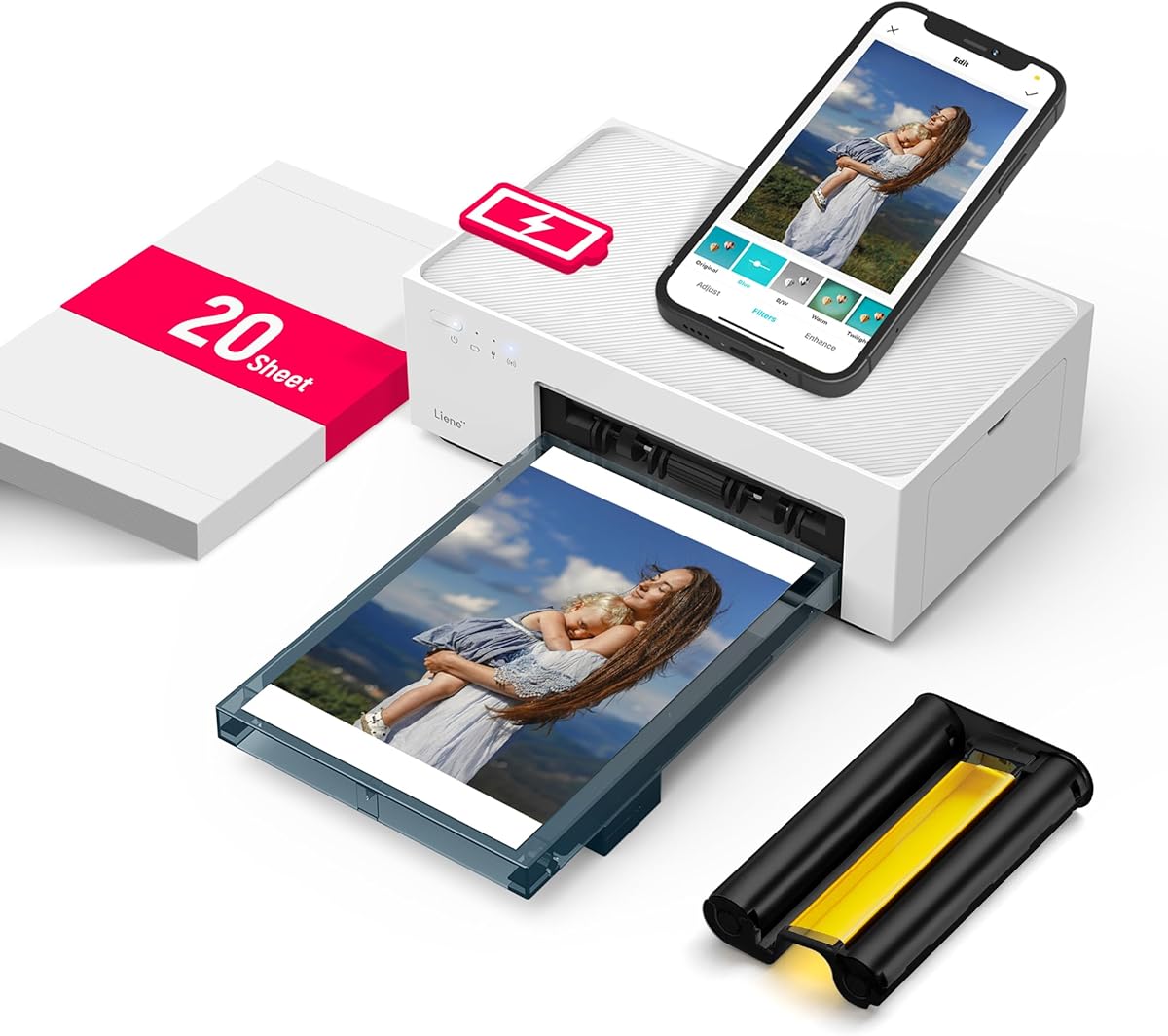
The Liene White M200 is a 4-by-6-inch dye-sublimation photo printer rated 4.5 out of 5. It provides a different proposition from the document-focused models in this guide: full-color, photo-oriented output in a rechargeable body designed for travel, celebrations, family events, and home use.
We may earn a commission when you buy through this link, at no additional cost to you.
Its built-in battery can produce up to 40 prints per charge, and it can also operate while connected to power. A built-in Wi-Fi hotspot enables connection in approximately three seconds and helps avoid dependence on an unreliable home network. The printer works with iOS, Android, laptops, and PCs, while supporting up to five simultaneous connections. The package includes 20 sheets of photo paper, an ink cartridge, and a power adapter.
The dye-sublimation process builds color through separate primary layers, producing vibrant images with a final layer intended to improve resistance to water, scratches, and fading. The app provides basic editing, filters, borders, and status notifications for depleted ink or paper. As a dedicated photo printer, it does not address general letter-size documents, and its value depends on using compatible media and maintaining the supplied cartridge system.
Choose the M200 for travelers, parents, students, photographers, and event hosts who want tangible color photos away from a home printer. It is also a creative gift option because its compact appearance, rechargeable operation, and editing features make it approachable. For a user whose priority is full-color photo output rather than office documents, the M200 is the premium selection in this roundup.
The rechargeable battery supports up to 40 prints per charge, allowing the printer to produce photos at celebrations, on trips, or wherever a conventional photo printer would be impractical.
The built-in Wi-Fi hotspot bypasses unstable household networks and can support up to five users. This makes the device useful at gatherings where several people want to print from their own phones.
We may earn a commission when you buy through this link, at no additional cost to you.
Choosing a portable printer requires matching battery life, print quality, media support, connectivity, and intended workload. The most useful model is the one that supports your real documents without forcing you to compromise on portability, print quality, or ongoing supply needs.
A genuinely battery-powered printer should have a documented rechargeable battery and a credible estimate of pages or prints per charge. The Epson WF-110 supports an internal lithium-ion battery and an optional external battery, the JADENS JD-166 states up to three hours of continuous use and 360 sheets per charge, the N80 lists up to 160 letter-size sheets, and the Liene M200 lists 40 photos per charge. Compare expected output with the length of a typical work day rather than focusing only on the battery capacity.
Choose a documented battery system and sufficient runtime for your normal assignments. If you travel through long locations without charging access, prioritize endurance, carry a compatible charger, and consider an optional external battery.
Inkjet printers provide familiar color document output and can handle conventional photo paper, but they require ink cartridges. Thermal printers use no ink, toner, or ribbon, yet they generally produce monochrome output and need specially compatible paper. Dye-sublimation is another distinct category, designed here for compact full-color photos rather than general office documents. Choose based on the output you need instead of treating inkless as automatically superior.
Choose a color inkjet for mixed documents and photos, a thermal printer for monochrome travel paperwork, or a dye-sublimation model for portable color photographs. Verify that the intended media is supported before buying.
Portable printers are often constrained by the media they can physically accommodate. The HP OfficeJet models support numerous letter, legal, card, photo, and envelope sizes. The A285M supports five thermal widths, while the D90E, JADENS, N80, and Gloryang focus on full-page or travel-oriented thermal formats. Crucially, thermal models generally cannot use ordinary copy paper, and some require branded or tightly specified media.
Check both paper dimensions and material compatibility before purchasing. Keep the required thermal stock in reserve if the printer will handle important documents, and never assume a full-size office sheet can be substituted.
Bluetooth is common among compact thermal printers, while Wi-Fi, Wi-Fi Direct, and mobile apps support broader device compatibility. The Canon TR160 can connect through Canon PRINT, AirPrint, Mopria, or direct wireless mode. Several thermal models use USB for computers because their phone workflow is app-based. Consider the devices you already own, the operating systems involved, and whether a router will be available.
Choose Bluetooth for a simple phone or tablet workflow, Wi-Fi for shared or router-based use, and USB when computer printing is essential. Install and test the required app or driver before relying on the printer away from home.
A printer that scans and copies can replace several separate tools in a mobile kit. The HP OfficeJet 250 includes all three functions, while the OfficeJet 200 is print-only. Thermal models generally focus on output, and the Liene M200 is specialized for photos. Extra functions usually add bulk or complexity, but they may be worthwhile when digitizing receipts, signed forms, and records is part of the workflow.
Choose a multifunction model if mobile scanning and copying are regular needs. Choose a focused printer if you only need output, a smaller thermal device for monochrome records, or a photo model for tangible color images.
A portable printer should be easy to pack, carry, and operate. Listed weights range from approximately 1.5 pounds for the A285M and N80 to 2.08 pounds for the D90E, while the Gloryang measures 1.7 inches thick. Cases, included paper, charging cables, and adapters can materially improve a mobile setup. Some packages include a charging adapter, while the D90E specifically does not, making a second charging plan important.
Choose a model that fits your normal bag and consider the complete travel kit rather than the printer alone. Confirm case dimensions, paper quantity, included cables, and adapter availability before placing an order.
Mobile printing often involves sending sensitive information through an app or across a network. The JADENS JD-166 emphasizes local printing, allowing documents to be produced from a connected device without routine cloud uploads. Other thermal printers use named apps such as Jadens Printer, Nada Print, Labelnize, or A285M software. App quality, file compatibility, and update support can be as important as the printer hardware itself.
Choose a model whose supported file types and app workflow match your documents. For confidential material, review privacy claims and favor local workflows. Test the app with your usual formats before making it a primary printer.
Thermal printers avoid cartridges, but they require compatible paper, which should be treated as a routine consumable. Inkjets require cartridge replacement and can produce stronger color output. The Epson WF-110 is designed for Epson Genuine Cartridges, and the Liene M200 uses an included ink cartridge with compatible photo paper. The right choice depends on how frequently you print and whether the content must be full color.
Choose thermal technology for low-maintenance monochrome work, while accounting for paper refills. Choose an inkjet or dye-sublimation printer when color quality justifies cartridge and media management.
Begin by charging the printer according to the manufacturer’s instructions and installing the required app, driver, ink, or thermal paper before leaving for a trip. Confirm that the selected paper size in the app matches the loaded media, especially on models that support several widths. A short test page can reveal battery, connection, alignment, and paper-feed problems while convenient setup options are still available.
For thermal printers, use only the compatible material specified in the instructions. Store rolls away from heat, moisture, and direct sunlight, and keep spare rolls flat or in their original packaging. If a jam occurs, follow the documented ejection method and avoid forcing the mechanism open. Inkjet and dye-sublimation models should be stored with their cartridges properly seated, and partially used supplies should remain sealed when the printer will be idle.
For long-term care, clean the exterior with a dry or lightly damp cloth, keep the paper compartment free of debris, and avoid exposing vents and charging ports to dust. Recharge before a trip rather than waiting for a depleted battery, especially for models with smaller batteries. Periodically review app and driver updates, confirm that replacement paper or cartridges remain available, and test the printer shortly before an important assignment.
A wireless printer connects to devices without a physical cable, but it may still require a wall outlet for power. A battery-powered printer includes a rechargeable power source that allows operation away from an outlet. The Canon PIXMA TR160 offers strong wireless portability, although the supplied product information does not identify an internal rechargeable battery.
No. Thermal printers require specially compatible thermal media, and ordinary copy paper will not produce an image. The Gloryang explicitly restricts use to its own thermal paper, while the D90E, JADENS, and N80 also specify compatible thermal formats. Check the paper requirement before buying, and consider ongoing paper availability.
The Liene White M200 is the dedicated photo option in this guide, using dye-sublimation to produce 4-by-6-inch color prints. It includes a rechargeable battery, Wi-Fi hotspot, photo paper, and an ink cartridge. The Canon PIXMA TR160 can also produce color and borderless prints, but the supplied information does not indicate that it has a built-in battery.
Many can work without one through Bluetooth, a direct wireless connection, or an app-based access point. The Canon TR160 includes Wireless Direct Mode, the HP OfficeJet models support setup with or without a router, and the Liene M200 provides a built-in Wi-Fi hotspot. Computer workflows on several thermal printers still require the appropriate USB driver.
Capacity depends on the printer's design and the width or format of the loaded media. Full-page thermal models generally work with rolled or folded letter-size media, while the A285M supports several widths and both continuous and single-sheet thermal paper. Consult the loading instructions because a printable width does not necessarily reveal the complete internal paper capacity.
It depends on the model. The N80 supports Bluetooth for phones and tablets but requires USB-C and a driver for laptops. The D90E also uses Bluetooth for mobile devices and USB for PCs. Other models may support computer connections through Wi-Fi or USB, so check the listed connection method before assuming Bluetooth will handle every device.
They avoid ink, toner, and ribbons, but they are not supply-free. Compatible thermal paper is a recurring consumable, and some models require specific branded rolls. For occasional monochrome documents, the simplicity can be valuable. For frequent full-color work, an inkjet or dye-sublimation model may be more practical despite cartridge use.
Check battery runtime, charger inclusion, printer weight, app compatibility, paper availability, and whether your required file formats are supported. Also confirm whether the printer works at the relevant size and whether ordinary paper is necessary. Installing the app and printing a test page before departure can prevent significant inconvenience.
The Epson Workforce WF-110 is the strongest balanced choice for cordless color work, with a built-in rechargeable battery, direct wireless access, and optional battery expansion. The Liene White M200 leads the dedicated photo category with dye-sublimation color output, while the Gloryang travel bundle offers an approachable thermal setup with a case and paper included.
Prioritize the output you need before comparing weight or convenience. A mobile office user may value scanning and copying from the HP OfficeJet 250, while a student or contractor may prefer the simpler A285M or D90E. Frequent photo users should focus on the Liene, and travelers should verify app compatibility, paper requirements, charging hardware, and file support before leaving home.
Product listings and included accessories can change, and current prices should be checked before purchasing. Use the comparison table to narrow the field, then review the detailed reviews for battery details, connection methods, media limitations, and intended use. The right battery powered portable printer is the one that delivers your necessary documents or photos reliably wherever work takes you.