
Cudy Gigabit Multi-WAN Router R700
4.4Editor score
Five Gigabit Ethernet ports
Up to five ISP connections
OpenWRT-ready control
Built-in VPN gateway
Automatic WAN failover
Load balancing routers combine multiple WANs for reliability and performance. This guide compares 10 leading models across ports, VPN, security, and management.
A load balancing router distributes traffic across multiple internet connections, helping a network maintain throughput and continuity when one WAN service slows or fails. The right model can also centralize VPN access, firewall controls, bandwidth management, and remote monitoring, making it useful beyond traditional offices.
The routers in this guide were compared using their documented WAN configurations, Ethernet port layouts, VPN capabilities, security features, management options, and stated client capacities. The list covers affordable multi-WAN models, professionally managed gateways, high-performance multi-gigabit systems, and options designed for centralized cloud administration.
Each review shows how a router fits into a particular deployment, while the comparison table makes hardware differences easier to scan. Ratings reflect the supplied marketplace feedback, and configurations should be checked for current availability because manufacturer revisions, supported hardware, and bundle contents can change.
4.4Editor score

4.7Editor score

4.0Editor score
This side-by-side overview compares the available WAN capacity, Ethernet performance, VPN support, security controls, and management style of all ten routers, from compact dual-WAN units to professional multi-gigabit gateways.


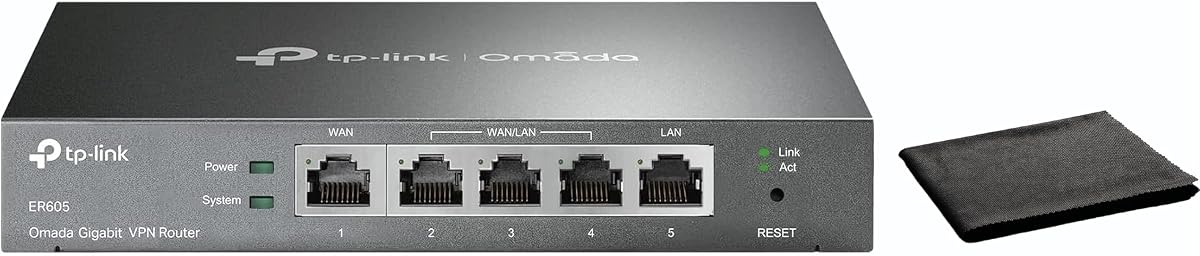

The TP-Link ER605 is a wired Gigabit VPN router built around flexibility rather than raw multi-gigabit throughput. Its 4.4 rating reflects a generally favorable balance of features, and the standout feature is the ability to use up to three WAN connections, including a USB-connected 4G or 3G modem for backup. It also includes a conventional LAN-oriented design that suits branch offices, small businesses, and technically capable home networks.
We may earn a commission when you buy through this link, at no additional cost to you.
The hardware includes one Gigabit WAN, two Gigabit WAN/LAN ports, and two Gigabit LAN ports, allowing administrators to choose how the flexible ports are assigned. Its security package goes beyond a basic firewall with DoS defense, IP, MAC, and URL filtering, a speed test, and VPN pass-through support. Remote connectivity is unusually flexible for this class, with room for 20 LAN-to-LAN IPsec connections and multiple OpenVPN, L2TP, and PPTP sessions.
The trade-offs are mostly about scope. This is not a wireless router, so it must be paired with access points when Wi-Fi is required. It also does not offer the cloud orchestration, live traffic dashboards, or multi-gigabit interfaces found in the more professionally managed models in this list. Those limitations make it less attractive for a large distributed organization, although they do not reduce its value as a dependable wired gateway.
It is a strong choice for a small office that needs two or three WANs, inexpensive cellular failover, and several remote-access protocols without requiring an enterprise controller. Buyers should confirm the exact WAN assignments, supported USB modem list, and desired VPN method before installation. For a straightforward small-network gateway with useful backup options, the ER605 remains a flexible recommendation.
The ER605 offers unusual flexibility for a compact wired gateway: one dedicated Gigabit WAN and two ports that can serve as WAN or LAN. That lets a network combine two broadband services with a cellular backup while preserving wired client ports.
Support for IPsec, OpenVPN, L2TP, and PPTP gives administrators several ways to connect remote sites or users. Filtering, SPI firewall functions, DoS defense, and VPN pass-through create a useful security foundation for a protected business network.
We may earn a commission when you buy through this link, at no additional cost to you.
The TP-Link ER7206 is a professional multi-WAN gateway with a 4.5 rating and a clear emphasis on scalable administration. It supports up to four WANs, including a Gigabit SFP WAN and two configurable Gigabit WAN/LAN ports. Its stated capacity of up to 700 clients and 150,000 associated client devices makes it a stronger candidate for growing offices, managed branches, and distributed small-business networks.
We may earn a commission when you buy through this link, at no additional cost to you.
Its primary differentiator is Omada SDN integration. The router can operate in a centralized environment that includes gateways, access points, and switches under a hardware controller, software controller, or cloud-based controller. Remote cloud access and the Omada application provide a unified management interface, while standalone operation remains possible for smaller installations that do not need a full SDN environment.
The main caution is ecosystem complexity. SDN operation requires compatible gateways, access points, switches, and controller choices, so a buyer should plan the entire network rather than evaluating this router in isolation. The ER7206 also remains a wired device and offers no built-in Wi-Fi. Despite these considerations, its four-WAN design, SFP uplink, and high client capacity give it clear value for professional managed deployments.
Choose the ER7206 when the network will expand, several sites need centralized control, or an SFP WAN connection is useful. It is less appropriate for a simple household seeking a ready-made wireless system. For organizations already invested in Omada, or willing to standardize around it, this is a strong professional multi-WAN router with room to grow.
Omada cloud access, software controller support, and hardware controller compatibility give administrators several paths to centralized management. This makes the ER7206 more appropriate for organizations that need consistent policies across gateways, switches, and access points.
Up to four WANs, a Gigabit SFP port, and a stated maximum of 700 clients provide room for redundancy and moderate growth. The flexible WAN/LAN ports also reduce the need to replace the gateway as connection requirements evolve.
We may earn a commission when you buy through this link, at no additional cost to you.
The Cudy R700 is a compact Gigabit multi-WAN router that combines a 4.4 rating with a notably open configuration. It can connect up to five ISPs, automatically shifting traffic when a connection fails and distributing traffic across available services. For a small office, home lab, or remote workspace, that combination of capacity and open-network flexibility is especially persuasive.
We may earn a commission when you buy through this link, at no additional cost to you.
OpenWRT readiness is the defining feature. It opens the door to VLAN segmentation, custom firewall rules, tailored QoS policies, and community-developed packages. The router also includes WireGuard, OpenVPN, IPsec, PPTP, and L2TP support in both server and client roles, making it possible to construct site-to-site tunnels or provide remote access without treating VPN as a separate product category.
Its security and management tools are practical rather than elaborate. A SPI firewall, DoS prevention, IP/MAC binding, domain filtering, and DMZ hosting cover common perimeter needs. The web interface, Cudy app, TR-069 support, ping, traceroute, NSLookup, and system logs help administrators diagnose problems, although this is not the same kind of real-time traffic visualization offered by higher-end enterprise gateways.
The R700 is best for administrators who want greater control than a locked-down consumer router provides but do not need multi-gigabit ports or a large SDN platform. Its limitations are the absence of faster optical uplinks and built-in wireless. For a capable, affordable multi-WAN system, it is an especially flexible pick and the strongest budget option in this roundup.
OpenWRT support turns the R700 into a platform for custom firewall rules, VLANs, QoS, and community packages. It is a better fit for network enthusiasts and technically independent administrators than for users who want a completely turnkey managed appliance.
The ability to connect as many as five ISPs supports both failover and traffic distribution. This makes the router useful for branch connectivity, small offices, and home labs that want multiple services represented by one gateway.
We may earn a commission when you buy through this link, at no additional cost to you.
The Alta Labs Route10 is the performance-focused premium choice in this guide, pairing a 4.0 rating with a high-speed port layout. Two 10 Gbps SFP+ interfaces and four 2.5 Gbps Ethernet ports place it well above conventional Gigabit gateways. Its quad-core Qualcomm network accelerator is designed for high-throughput routing, firewall rules, VPN traffic, VLAN work, and other bandwidth-intensive tasks.
We may earn a commission when you buy through this link, at no additional cost to you.
Integrated PoE+ is another feature that separates it from a standard multi-WAN router. Compatible access points, network devices, and edge hardware can receive power through Ethernet, reducing the need for separate adapters or injectors. The router also provides real-time bandwidth statistics, connected-device information, WAN and LAN traffic views, and system performance monitoring for diagnosing congestion and planning capacity.
The trade-off is its fixed role as a wired platform. Route10 does not broadcast Wi-Fi and must be paired with one or more access points. It also supports an ecosystem centered on Alta Labs switches, access points, and controllers, which is advantageous within that environment but may add integration work elsewhere. The lower rating also warrants careful attention to current customer feedback and verified use cases.
Choose Route10 for advanced homes, professional studios, high-bandwidth offices, or enterprise-style branch networks that require 10G and 2.5G connectivity, PoE+, and detailed visibility. It is especially compelling when the deployment includes other Alta Labs hardware. For users seeking a premium, high-speed routing platform without integrated wireless, it is a compelling choice.
The combination of 10G SFP+ and four 2.5G ports supports high-capacity WAN aggregation, fast local links, and modern access points. Hardware-assisted processing is intended to keep routing and encrypted traffic responsive under demanding workloads.
PoE+ can simplify deployment by powering compatible edge devices over the same Ethernet connections used for data. Live bandwidth and device statistics help administrators identify congestion, compare WAN traffic, and respond to emerging issues.
We may earn a commission when you buy through this link, at no additional cost to you.
The Omada ER7412-M2 is a multi-gigabit VPN router built for organizations that want many WAN paths and a deep security feature set. Its 4.5 rating reflects a favorable user response, while the standout specification is load balancing across up to 11 WAN ports. The hardware combines two 2.5G RJ45 ports with ten Gigabit WAN/LAN positions, including two SFP slots.
We may earn a commission when you buy through this link, at no additional cost to you.
This unusual density makes it suitable for consolidating numerous broadband or service connections behind one routed boundary. Security is comprehensive, with SSL, IPsec, GRE, WireGuard, PPTP, L2TP, and OpenVPN options. The defensive stack includes DoS and DDoS protection, IP, MAC, and URL filtering, deep packet inspection, and intrusion prevention and detection systems.
Those same capabilities make the router less suitable for a very simple home network. Configuration, policy planning, and ongoing administration require more attention than a basic consumer unit demands. Physical port count alone does not guarantee that every service provider can be used simultaneously, so buyers should verify WAN compatibility, addressing, routing requirements, and upstream service limitations before deployment.
The ER7412-M2 is a strong choice for campus-like offices, managed branch networks, and organizations that value exceptional WAN aggregation and security. It is a better match for an experienced administrator than an average household. When the number of internet services genuinely justifies its port density, the model offers a remarkably capable combination of routing, VPN, and defense tools.
Supporting load balancing on up to 11 WANs is exceptional for a single router. The port mix can accommodate many broadband services while retaining fast local links for servers, access points, and multi-gigabit clients.
Deep packet inspection, intrusion prevention and detection, filtering, and DoS protection provide multiple ways to control unwanted traffic. A broad VPN portfolio also supports secure site links and remote access from a single gateway.
We may earn a commission when you buy through this link, at no additional cost to you.
The TP-Link TL-R470T+ is a small-form-factor multi-WAN router intended for offices and internet-cafe style deployments. Its 4.2 rating is supported by a straightforward feature set: up to four 10/100M WAN ports, advanced load balancing, backup capability, and control over how bandwidth resources are assigned to clients.
We may earn a commission when you buy through this link, at no additional cost to you.
Portal authentication and client account management are particularly relevant for public or shared network environments. The router can marshal bandwidth according to different client groups and application needs, which gives operators more control than a basic consumer router. DDNS, DoS protection, and IP/MAC binding further support remote management and network security.
The decisive limitation is interface speed. All four WANs are Fast Ethernet rather than Gigabit, and the device lacks the multi-gigabit headroom needed by modern fiber, high-speed broadband, modern cloud services, and demanding local networks. It may still be effective where upstream connections are modest and traffic is primarily conventional web, email, and browsing.
Buyers should choose the TL-R470T+ for a small venue with several modest-speed WAN connections, portal access, and client bandwidth policies. It is less appropriate for a modern home, growing office, or campus that expects higher-capacity broadband. Within those constraints, its compact design and multi-WAN focus remain practical.
Portal authentication and account management help operators control access in cafés, offices, and other shared spaces. These features can simplify onboarding while keeping client activity within clearly defined policies.
The router can direct bandwidth resources toward clients according to their application environment. This is a practical form of traffic management for networks where different users have different performance requirements.
We may earn a commission when you buy through this link, at no additional cost to you.
The TP-Link TL-R480T+ is a straightforward five-port broadband router with a two-WAN layout. Its 4.2 rating reflects a dependable, uncomplicated approach, and its configuration of two WAN ports plus three LAN ports makes it suitable for a small network that wants basic traffic distribution or connection redundancy.
We may earn a commission when you buy through this link, at no additional cost to you.
Its virtue is simplicity. Rather than combining a broad collection of enterprise features, the TL-R480T+ focuses on the core function of balancing two broadband connections. The compact five-port design can fit naturally into a small office, retail location, or home network where administrators want a separate wired gateway without deploying a large platform.
That simplicity also sets limits. The available product information does not identify the same depth of VPN, security, monitoring, or centralized management found in several newer multi-WAN options. As a result, a buyer with substantial remote-access requirements, many internet services, modern multi-gigabit connections, or sophisticated policies may need a more capable model.
The TL-R480T+ is best for a basic deployment that values two WAN paths, a clear physical layout, and uncomplicated administration. It is less compelling as a long-term platform for a fast-growing organization. If its core dual-WAN functions meet the network's requirements, it remains a concise and efficient choice.
Two WAN connections allow the network to combine services or maintain an alternate path. This simple configuration is useful when the goal is continuity rather than the large WAN count required by a complex enterprise.
Three LAN ports provide enough wired capacity for a compact office or home setup. The router is easier to place and manage than a full rack-oriented gateway, while still separating internet routing from access-point duties.
We may earn a commission when you buy through this link, at no additional cost to you.
The TP-Link ER-605 is a dual-WAN Gigabit VPN router with a 4.3 rating and a strong focus on business security. Two WAN ports allow load balancing between internet services, while an SPI firewall, DoS defense, VPN support, and filtering tools protect the routed network. The supplied title also highlights bandwidth management, making it useful where applications have different performance needs.
We may earn a commission when you buy through this link, at no additional cost to you.
Management is more approachable than on many professional gateways. An intuitive web interface, Omada app compatibility, and centralized cloud monitoring provide visibility into network status and configuration. The cloud tools can be valuable for remote administration, although a business that does not want an external management service may prefer to keep its configuration entirely local.
Compared with the Cudy R700, ER7206, ER7412-M2, and Route10, the ER-605 has fewer WAN interfaces and less advanced processing. It also does not provide the high-speed 2.5G and 10G options found in premium models. These are meaningful limitations for a modern fiber deployment, but they are less important where two Gigabit WAN services and conventional business traffic are the actual requirements.
The ER-605 is a good fit for a small or medium business that wants dual-WAN continuity, VPN connectivity, QoS, and remote monitoring in one box. It is also a credible option for a technically capable home network. Buyers should decide whether cloud monitoring aligns with their security policy, then verify the desired VPN protocols and dual-WAN behavior.
The combination of SPI firewall protection, DoS defense, and multiple VPN protocols creates a useful baseline for a business network. It brings essential perimeter and remote-access functions together without requiring separate appliances.
Centralized cloud monitoring allows administrators to check network status away from the premises. QoS and bandwidth management help prioritize important traffic and reduce the effect of congestion on critical applications.
We may earn a commission when you buy through this link, at no additional cost to you.
The Ubiquiti EdgeRouter 4 combines a strong 4.6 rating with a compact, efficient hardware design. It provides three 10/100/1000 Mbps Ethernet ports, a serial RJ45 connection, and a Gigabit SFP port. Those interfaces make it a credible edge-routing option for a small office, branch, or advanced home network, particularly where a fiber or other SFP uplink is useful.
We may earn a commission when you buy through this link, at no additional cost to you.
The router's physical design is unusually adaptable. It supports desk, wall, and rack mounting, uses an internal power supply, and operates without a fan. Maximum power consumption is stated at 13 watts, making it suitable for deployments where quiet operation, simple placement, and efficient resource use matter.
Its limitations are important for a load-balancing comparison. There are only three Ethernet ports, no integrated wireless radios, no PoE output, and no multi-gigabit interface. Whether it can support a particular multi-WAN arrangement therefore depends on its routing software, available WAN assignments, and the specific connection types in use.
The EdgeRouter 4 works best for a compact, technically managed network with a small number of wired endpoints and a possible SFP backbone. It is less appropriate for a café, a rapidly expanding office, or an administrator who wants a physical multi-WAN port array. For a well-planned small deployment, its strong rating and flexible installation are compelling advantages.
The dedicated Gigabit SFP port can accommodate compatible fiber or other SFP connectivity, giving a small network more uplink options than a basic copper-only router. The additional serial interface may also assist in troubleshooting or specialized management.
Fanless construction and an internal power supply make the EdgeRouter practical for offices and living spaces. Desk, wall, and rack mounting allow it to fit either a visible workstation position or a more organized network installation.
We may earn a commission when you buy through this link, at no additional cost to you.
The Omada Fusion is the most approachable professional option in the list, combining the highest supplied rating at 4.7 with a modern five-port, all-2.5G design. It supports load balancing across as many as four WAN connections and automatic multi-WAN failover, giving modern networks a useful balance of speed and connection resilience.
We may earn a commission when you buy through this link, at no additional cost to you.
The quad-core processor is designed to handle routing and network services without lag, while the multi-gigabit ports provide room for high-speed broadband, modern access points, and local data movement. A particularly distinctive feature is the 2.51-inch touchscreen, which displays health scores, speed tests, alerts, and real-time traffic for on-site troubleshooting without opening a laptop.
Management is also unusually accessible. License-free cloud access and a built-in controller make advanced capabilities available from the beginning, while Bluetooth setup through the Omada app can automatically discover and batch adopt other compatible Omada networking devices. The trade-off is dependence on the Omada ecosystem and the need for separate access points because the router does not provide Wi-Fi.
The Fusion is ideal for a modern small business, distributed office, or advanced home network that wants multi-gigabit connectivity and centralized management without assembling several boxes. Its combination of four-WAN support, fast ports, cloud access, and local touchscreen diagnostics makes it the most balanced recommendation in this roundup.
Five 2.5G ports avoid the bottleneck associated with older Fast Ethernet or Gigabit-only gateways. Up to four WANs can be balanced for throughput or used with automatic failover when a primary connection becomes unreliable.
The built-in touchscreen provides health scores, speed tests, alerts, and live traffic information directly on the appliance. This is particularly useful for quick on-site checks during installation or an unexpected network event.
The integrated controller and license-free cloud portal provide access to advanced features without a separate local controller. Bluetooth-assisted discovery and batch adoption can also shorten deployment time when several compatible Omada devices are installed.
We may earn a commission when you buy through this link, at no additional cost to you.
A useful load balancing router must do more than combine internet connections. The right choice depends on WAN count, line speed, VPN requirements, management style, security policy, and the number of wired clients that must be supported.
Begin by counting the internet services that must operate simultaneously and identifying the speed of each connection. A router with two WANs may be enough for one primary service and one backup, while the ER7412-M2 supports load balancing across as many as 11. Port speed matters too: the TL-R470T+ uses 10/100M interfaces, whereas the Fusion, Route10, and ER7412-M2 provide 2.5G or faster options suited to modern fiber and local traffic.
Choose enough WAN capacity for current services and plausible growth. Do not count an optical slot as a conventional WAN without confirming compatible modules, routing support, and configuration.
Load balancing and failover are related but distinct functions. Load distribution sends selected traffic across multiple lines, while failover shifts important traffic to a backup when a primary path fails. Some deployments want both, while others use one connection strictly as a reserve. Review whether the router supports policy-based balancing, weighted distribution, health checks, and automatic recovery.
Test the behavior with the applications your organization actually uses. A backup that activates too aggressively can interrupt sessions, while an unsuitable balancing policy can send demanding traffic to a slower link.
The WAN and LAN sides both influence practical performance. A gigabit WAN can be wasted if internal links force traffic through 100M ports, and high-speed local networks benefit from 2.5G or 10G interfaces. SFP slots add flexibility for fiber or compatible network media, while PoE+ can simplify access-point and edge-device deployment by delivering power and data over one cable.
Match port speeds to actual services and clients. Expensive high-speed ports are unnecessary for a modest network, while a heavily virtualized or media-intensive office may need considerably more capacity than a simple home setup.
VPN support is essential for remote users, site-to-site links, and access to private services. The products here offer combinations of WireGuard, OpenVPN, IPsec, GRE, L2TP, and PPTP. Protocol choice should reflect the devices and operating systems used by remote staff or connected sites, as well as the security policies of the organization.
Also check the supported connection roles. A gateway may provide a server feature for inbound access but not the corresponding client feature, and advertised tunnel totals can differ by protocol. Verify current firmware documentation before committing to a model.
A business router should include more than basic NAT. SPI firewall functions, DoS protection, IP and MAC filtering, URL or domain filtering, VPN pass-through, and intrusion detection can all reduce exposure and help administrators contain unwanted activity. Features such as DPI, IPS, IDS, and DMZ hosting are more relevant where precise application control or hosted public services are important.
Choose controls that you can maintain. A rich feature set has little value if it cannot be configured easily or monitored after installation, so balance security depth with the management resources available to operate it.
Management style can determine the total complexity of a deployment. The ER7206 and Fusion fit well into the Omada ecosystem, while the Route10 integrates with Alta Labs equipment. The Cudy R700 favors OpenWRT-level customization, and several other routers offer a conventional local web interface. Remote cloud access is convenient for distributed sites, but administrators should review whether cloud management matches their privacy and security requirements.
Standalone operation can be valuable when outages, remote administration, or vendor dependence are concerns. Confirm which advanced features remain available without a subscription or separately purchased controller.
A stated client maximum is a starting point, not a complete forecast. The ER7206 lists up to 700 clients and a much larger number of associated client devices, but throughput, enabled services, encrypted traffic, and application behavior all influence real performance. Networks running large file transfers, backups, voice services, or virtual desktop connections require more consideration than a router used only for browsing and email.
Review memory, processing hardware, and supported client figures together. Leave reasonable headroom for growth rather than selecting a model based on one headline capacity number.
Reliable multi-WAN networks need clear feedback when service quality changes. The Fusion provides an on-device touchscreen with health scores, speed tests, alerts, and real-time traffic. The Route10 offers live bandwidth, device, WAN, LAN, and system statistics, while the Cudy R700 includes ping, traceroute, NSLookup, and system logs. Smaller routers may offer fewer views but remain adequate for a simple network.
Choose diagnostics that match how the router will be maintained. Remote visibility helps distributed teams, while local tools are valuable for technicians working on-site without a laptop.
Begin by documenting each WAN service, including its connection type, required address information, expected speed, and purpose. Decide which connections will handle normal traffic, which provide backup capacity, and how failover should be triggered. Firmware should be updated before the router is moved into production, and all WAN and LAN cables should be connected according to the manufacturer's port assignments.
Configure the router from a trusted wired device before completing the build. Establish separate administrative credentials, review firewall policies, enable only the VPN protocols needed by the organization, and test internet access through each WAN independently. After that, enable the intended balancing or failover policy, confirm automatic recovery, and verify that critical applications remain reachable when a primary connection is disconnected.
For ongoing care, review system logs, WAN health, traffic distribution, and VPN status on a regular basis. Keep firmware current, back up configuration files where the platform supports them, and document every change. Secure the router itself with a management password, restrict remote administration appropriately, and place it in a ventilated, protected location. A monthly failover test and a periodic review of connected devices can reveal problems before they become service interruptions.
Load balancing distributes selected traffic across multiple active WAN connections to increase aggregate throughput. Failover moves traffic to a backup WAN after a primary connection fails. Some multi-WAN routers can perform both, so the administrator can define which services participate in distribution and which connection serves as the standby path.
Multiple providers are required if the goal is to combine separate internet services or maintain connectivity during an outage. A single provider may offer several services, but those services can share the same underlying infrastructure and may not fail independently. Using a cellular USB modem as another WAN can provide a more diverse backup path when supported.
They can be useful in advanced homes that need ISP failover, large downloads, or a dedicated wired gateway. A basic household with one reliable broadband service may not need the added configuration complexity. Models such as the Cudy R700 and TP-Link ER605 are more approachable for home labs and technically confident users.
No. A load balancing router primarily routes traffic between multiple WAN connections and internal LAN clients. Many products in this guide are wired and do not broadcast Wi-Fi, so they require separate access points. A wireless router with a built-in radio can provide coverage, but a dedicated multi-WAN gateway often offers more WAN, VPN, and routing options.
Gigabit is a common baseline, while 2.5G is useful for modern fiber plans, fast access points, NAS devices, and high-resolution media workflows. A 10G interface may benefit demanding professional networks but is rarely necessary for ordinary browsing. Match the gateway, switches, and client equipment so faster ports are not limited by slower links elsewhere.
Cloud management can be helpful when administrators need remote visibility or coordinate several sites. It may not be necessary for a single location with regular local access, and some organizations have policies against remotely managed appliances. Compare standalone features, local monitoring, ecosystem fit, and the availability of advanced controls before deciding.
After configuring the backup path, disconnect or disable the primary WAN while maintaining access through the alternate connection. Confirm that the router detects the failure, changes the traffic path, and restores normal service when the primary WAN returns. Repeat the test periodically because ISP address changes, firmware updates, or policy edits can affect the behavior.
A multi-WAN router may include firewall, VPN, DHCP, and traffic-control functions, but it does not automatically provide wireless coverage or every specialized security feature. A complete deployment may still need access points, switches, endpoint protection, and a dedicated security appliance. Assess each role separately before assuming one device can handle the entire network.
The Cudy R700 stands out as the best budget option because it combines up to five ISP connections, OpenWRT-ready control, a broad VPN suite, and automatic failover in a compact router. The Omada Fusion is the most balanced overall choice, offering five 2.5G ports, four-WAN capability, license-free cloud management, and unusually useful on-device diagnostics.
The Alta Labs Route10 is the premium selection for installations that need 10G SFP+, multiple 2.5G ports, hardware-accelerated processing, PoE+, and detailed real-time monitoring. Before purchasing any model, prioritize WAN count, actual line speed, VPN compatibility, management resources, and security requirements rather than focusing on a single headline specification.
Finally, check current product listings, manufacturer documentation, supported accessories, and firmware details before making a purchase. Port configurations and management features can change, and the router's value depends on how closely its supported functions match the planned network.