
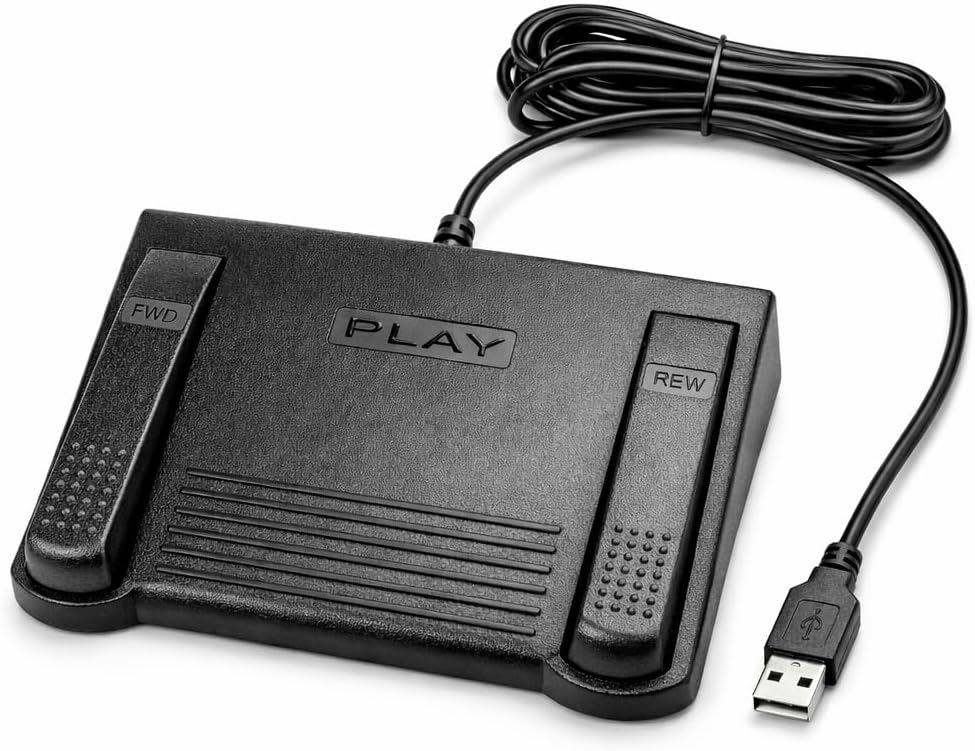
DAC 3 Function Foot Pedal
5.0Editor score
Large labeled function buttons
USB computer connection
Dedicated workflow controls
Foot pedals for transcriptionists compared for control options, comfort, compatibility, reliability, and ease of setup.
Foot pedals for transcriptionists put playback, rewinding, and recording controls under your foot, allowing you to keep both hands on the keyboard and maintain a steadier transcription rhythm. A good model should feel stable, respond consistently, and reduce accidental commands without forcing awkward foot movements.
The ten models in this guide were compared using their supplied specifications, including pedal layout, control method, software compatibility, switching technology, and intended workflow. The list covers general transcription systems, dedicated Express Scribe hardware, configurable professional controls, and programmable USB models for users who need broader command options.
Each review explains the strongest reason to consider a particular pedal, along with its limitations and ideal working environment. Ratings reflect the customer feedback supplied with each listing and can change over time. Product availability and prices also fluctuate, so confirm the current listing and compatibility before making a final purchase.
5.0Editor score

4.5Editor score

4.4Editor score
This side-by-side overview highlights each pedal's control layout, connection method, switch type, compatibility, and standout physical design features for comparing transcription workflows.




The Infinity 3 USB Foot Pedal Control with Computer Plug In, one unit combines a conventional three-pedal transcription layout with a direct USB connection and a 4.5 customer rating. Its standout qualities are the wide, centrally sloping Play pedal, clearly separated side controls, and heavy-duty micro switches designed for repeated professional use. It offers a practical balance of familiarity, responsiveness, and mechanical durability.
We may earn a commission when you buy through this link, at no additional cost to you.
The most important feature is the geometry of the center pedal. Its broad, sloped surface gives the working foot a natural place to rest while still making the transition to Fast Forward or Rewind relatively easy. That matters during a long document because a transcriptionist can control playback without repeatedly lifting the entire foot or searching for a small switch. The micro switches are another meaningful strength, as the product is built around components intended to withstand countless hours of operation.
There are still trade-offs. The listing does not describe universal operation with every transcription application, so buyers should verify whether their preferred software recognizes the standard controls or requires a setup utility. As with any three-pedal design, users must develop a consistent foot position to reduce the chance of an unintended side-pedal press. The supplied information also does not mention a battery, so it should be treated as a wired USB model rather than a portable wireless option.
This pedal is best for a transcriptionist who wants a proven, straightforward three-control setup without moving into software-specific or fully programmable hardware. It is particularly suitable for recurring play, rewind, and fast-forward work. Overall, the Infinity 3 earns the Editor's Choice position because it addresses the core needs of transcription directly: reachable controls, durable switching, and an ergonomic center surface.
The wide, sloping center pedal gives the foot a defined resting position between commands. That design can reduce unnecessary movement during extended transcription work while making Play, Fast Forward, and Rewind controls easier to locate without looking down.
Ultra-heavy-duty micro switches are a meaningful advantage for high-volume workflows. They support the pedal's positioning as a dependable everyday tool for users who repeatedly trigger playback functions throughout the day.
We may earn a commission when you buy through this link, at no additional cost to you.
The VEC in-USB-2 Infinity Digital Foot Control with USB Computer Plug carries a 4.4 rating and stands out for combining rechargeable operation with a conventional transcription-oriented pedal layout. Its digital construction, broad compatibility, and mechanical center stop make it a strong option for users who want a wireless-feeling workflow without giving up familiar Play, Fast Forward, and Rewind-style operation.
We may earn a commission when you buy through this link, at no additional cost to you.
Compatibility is central to this model's appeal. The supplied information states that it works with most leading dictation and transcription brands and with PCs, desktops, laptops, and portable computers equipped with USB ports. Its rechargeable battery is rated for up to 1,000 hours of digital recording time, which can simplify a mobile or shared-workstation setup. The precision switches are specified for 2,000,000 depressions, supporting the product's professional positioning.
The mechanical stop is an especially thoughtful detail. It helps prevent accidental activation of the center pedal while the user steps on a side pedal. That protection may make the pedal more suitable for a fast or relaxed working style than an unprotected three-switch design. The trade-off is the need to recharge the internal battery, and buyers may need to configure the pedal for their software even though the supplied description emphasizes broad compatibility.
This control is a good match for transcribers moving between locations, sharing computers, or working in setups where a permanently cabled pedal is inconvenient. It also suits users who appreciate a physical stop against unintended center commands. With its 4.4 rating and stated compatibility across many platforms and leading products, it is a versatile option, though the Infinity 3 remains the simpler wired choice for many users.
A rechargeable internal battery removes the need to remain tethered during use. The stated 1,000-hour digital recording window can also reduce the disruption associated with swapping disposable batteries.
The mechanical stop is designed to resist accidental triggering of the center pedal when a side pedal is pressed. That added control can improve confidence for users who move their foot quickly during demanding transcription sessions.
We may earn a commission when you buy through this link, at no additional cost to you.
The Philips ACC2330 4-Pedal Foot Control for Digital Systems for Professional Dictation with Toe Touch Control offers a four-pedal alternative to the common three-control format. Its 4.1 rating reflects a solid but less exceptional customer history, while the design itself gives professional dictation users more separated actions than a basic Play, Rewind, and Fast Forward arrangement.
We may earn a commission when you buy through this link, at no additional cost to you.
The pedal's interaction method is its defining trait. It supports easy toe-touch control, allows the user to swing the foot using the heel, and provides a way to relax the foot during pauses. Its center pedal is wider than those on many conventional models, which helps avoid unintended presses of adjacent pedals and lets the user feel when the foot enters a different control area. Those details encourage a more deliberate four-position workflow.
A four-pedal layout also introduces complexity. New users may need more practice to establish consistent foot placement, and the additional command must be supported by the chosen digital dictation system. The supplied information does not provide a universal software compatibility statement, so the buyer should check the current system requirements before ordering. The benefits are worthwhile for a professional setup that can use four separate commands, but less compelling when only three functions are needed.
This Philips model is best for professional dictation and transcription users who can map four actions to their workflow and prefer distinct toe and heel access. It may be especially useful when one action can be relegated to a separate pedal, reducing the need to hold or combine commands. For buyers seeking the widest professional control layout, it offers a more specialized and potentially more efficient alternative to a three-pedal unit.
Four separated pedals let a user assign distinct actions rather than relying on combinations or repeated presses. The extra command can be valuable in professional dictation environments where recording, playback, and navigation each have a dedicated function.
The increased center-pedal width creates more separation from neighboring controls. Its tactile boundary also helps the user recognize when the foot has moved into another control area.
We may earn a commission when you buy through this link, at no additional cost to you.
The DAC 3 Function Foot Pedal- FP-110-USB has a 5.0 customer rating, the highest supplied score in this guide. It distinguishes itself with three large, clearly labeled buttons: Next Job, Rew/Play, and Record. Rather than reproducing a generic three-pedal arrangement, this model presents a more job-oriented command set that can appeal to professional workflows built around sequential document handling.
We may earn a commission when you buy through this link, at no additional cost to you.
The labels are a substantial practical advantage. A new user can immediately understand the intended action of each button, while experienced users can locate controls by feel and position. The large button surfaces should also make the pedal easier to operate for users who prefer deliberate, broad foot movements. A standard USB connector provides a straightforward link to a compatible computer and reduces the need for a proprietary computer-side cable.
Compatibility is the principal limitation. The product information specifies that it works with certain computer software designed for foot control, so it should not be considered universally compatible with every transcription platform. Its dedicated Next Job function may also require an application that supports that type of command. Buyers should confirm both the physical connection and the software's accepted functions before purchasing.
The DAC FP-110-USB is best for users whose software supports its exact command set, especially professionals who handle one assignment after another and value clear, large controls. Its 5.0 rating and purpose-specific design justify the Best Premium designation, but only when software compatibility aligns. If the application cannot map the buttons, a broader programmable model will usually be the more practical purchase.
Next Job, Rew/Play, and Record communicate each pedal's purpose immediately. Clear labeling reduces setup uncertainty and makes the control layout easier to incorporate into a structured document workflow.
The enlarged controls create an easy target for the foot. This is useful in a professional setting where quick navigation and record commands are repeated throughout the day.
We may earn a commission when you buy through this link, at no additional cost to you.
The Infinity USB Digital Foot Control with Computer Plug (IN-USB3) earns a 4.5 rating and focuses on a compact, low-profile design. Its expanded non-slip surface area is the most important supplied feature because it directly affects stability and the need to reposition the pedal during a long transcription session.
We may earn a commission when you buy through this link, at no additional cost to you.
A lower housing can make a foot control feel less obtrusive under a desk, particularly when the user's leg is positioned close to the unit. The enlarged non-slip area adds practical stability around that low profile, helping the pedal remain in a predictable location. The computer plug offers a familiar connection method for Windows, Mac, or other USB-equipped systems, subject to the requirements of the transcription software.
The product information is concise, so buyers should not infer details that are not stated. It identifies an Infinity USB digital foot control, a low-profile design, and a greater non-slip surface area, but it does not provide switch-life figures, battery details, or a universal compatibility guarantee. Software recognition and exact button assignments should therefore be confirmed through the current product documentation and seller listing.
This Infinity model is best for users who prioritize a small physical footprint and stable floor contact over extensive configuration options. It may be particularly attractive in a crowded workstation where a taller pedal would be inconvenient. With a 4.5 rating and a design centered on low profile and traction, it is a straightforward option for a dedicated transcription setup, provided the connected software supports its controls.
The low-profile body can fit more comfortably beneath a desk than a tall pedal. It helps preserve leg clearance while retaining a wired USB connection.
A greater non-slip surface area helps the unit remain where it is placed. Stable positioning is valuable because even a small shift can change how comfortably the foot reaches each control.
We may earn a commission when you buy through this link, at no additional cost to you.
The Express Scribe Transcription Foot Pedal ECS-FPAE is a specialized model for Express Scribe users rather than a general-purpose transcription controller. Its 3.8 rating is the second-lowest supplied rating, but that figure should be interpreted in the context of an intentionally narrow hardware platform. The defining benefit is a modified internal control board built specifically for seamless Express Scribe operation.
We may earn a commission when you buy through this link, at no additional cost to you.
The pedal is pre-programmed and ready to use after connecting its USB cable. The supplied information says no foot pedal wizard or manual configuration is required, which removes a common source of setup friction. It supports the free and paid editions of Express Scribe on Windows and Mac, making it a direct choice for users who already rely on that NCH Software environment.
The strongest drawback is explicit incompatibility with Case Catalyst and other transcription programs. That limitation makes the ECS-FPAE unsuitable as a universal pedal, even if its physical design appears similar to multi-program options. The software is not included with the pedal, so buyers must already own or separately obtain Express Scribe. Its one-year mail-in parts and labor warranty offers some support, but the narrower use case remains the deciding factor.
This model is best for a user who works exclusively in Express Scribe and values immediate setup. The dedicated board and oversize play, fast-forward, and rewind layout can make daily control more consistent than configuring a generic HID pedal. It is a poor fit for someone who expects to move among different transcription applications. For a dedicated Express Scribe workstation, however, the focused design is the main reason to choose it.
The modified internal control board is tailored to Express Scribe, allowing the pedal to function without the usual setup wizard. This can simplify installation for users who want the computer and pedal ready for work.
Large play, fast-forward, and rewind areas give the foot broad targets and support low-fatigue movement. The layout is intended to make repeated navigation less demanding during extended sessions.
We may earn a commission when you buy through this link, at no additional cost to you.
The ECS-IN-USB-1 Foot Pedal Transcription Foot Control, Infinity, Ergonomic – Effortless Transcribing & Dictation, Transcribe & Dictate with Ease has a 3.5 rating, the lowest score supplied for this list. Even so, its stated design targets a common need: reliable, hands-free audio playback control for professional users who want to keep their fingers on the keyboard.
We may earn a commission when you buy through this link, at no additional cost to you.
The pedal is described as compatible with most major dictation and transcription software platforms, which makes it more broadly relevant than a model tied to one named application. Its ergonomic, contoured layout is designed to support natural foot positioning and reduce strain during extended use. The product information also identifies medical, legal, insurance, and public safety environments as suitable professional applications, reflecting the repetitive nature of transcription work.
The lower customer rating means buyers should investigate recent feedback carefully, particularly around the exact control behavior they need. The listing does not enumerate the pedal's button functions, switch specifications, or setup process in detail, so it would be unwise to assume feature parity with the explicitly mapped Infinity 3 or programmable HID models. The one-year mail-in parts and labor warranty provides a form of coverage, but hands-on compatibility verification remains important.
This model is best for a buyer who values a general transcription control, an ergonomic shape, and broad software reach more than a precisely specified set of commands. It may fit professional users seeking a straightforward Infinity-branded foot control without committing to a narrowly compatible device. The design is sensible, but the lower rating and limited technical detail make it a less confident recommendation than the strongest models in the guide.
The contoured construction is intended to keep the foot in a natural position during long working periods. Ergonomics are particularly important when a foot control is used continuously rather than only for occasional commands.
Support for most major dictation and transcription platforms makes this a practical option for many professional environments. Users should still confirm the exact software and operating system used at their workstation.
We may earn a commission when you buy through this link, at no additional cost to you.
The iKKEGOL Upgraded USB Triple Foot Pedal Switch Control 3 Three Key Footswitch Program Customized Computer Keyboard Mouse Game Action HID combines a 4.4 rating with an unusually broad set of programmable uses. Rather than limiting itself to audio playback, this standard HID device can operate as a programmable keyboard or mouse control for transcription, medical applications, push-to-talk functions, media commands, and other hands-free workflows.
We may earn a commission when you buy through this link, at no additional cost to you.
Its optical switch is the standout technical feature. The product information describes it as quiet, which can be valuable in shared offices, call centers, or recording environments where mechanical clicking may be distracting. Durable, sensitive switches are also specified, and the wide pedal with a large surface area is designed for comfortable extended use. The stated ability to bear more than 100 kilograms indicates a robust physical design.
The trade-off is that programmability creates a setup step. A user must assign the desired commands rather than relying on a fixed transcription mapping, and buyers should not expect the same out-of-the-box behavior as a model pre-programmed for a named application. The optical mechanism may also feel different from a spring-loaded mechanical pedal, so people with a strong preference for mechanical feedback should consider that difference. Four TPU rubber pads are included for hard-floor stability.
This iKKEGOL is best for a budget-conscious transcriptionist who wants to customize playback keys, mouse actions, or other commands across different tasks. It is especially compelling in a quiet workspace because of the optical switch. For a fixed Express Scribe setup, the dedicated ECS-FPAE would be simpler; for a user who wants flexibility across multiple software environments, this programmable triple pedal offers greater control.
The optical switch provides a quieter alternative to a conventional clicking mechanical switch. That can reduce distraction for coworkers, supervisors, or callers sharing the same environment.
As a programmable HID device, the pedal can represent separate keyboard or mouse commands. That flexibility makes it useful for transcription shortcuts, push-to-talk operation, media control, and other tasks that benefit from hands-free input.
We may earn a commission when you buy through this link, at no additional cost to you.
The Philips LFH-2330 Configurable USB Foot Control/Pedal (LFH2330) combines four independently configurable pedals with a slim ergonomic shape. Its 4.2 rating reflects a well-regarded but not flawless customer history, while the feature set offers a strong combination of professional configuration and physical comfort.
We may earn a commission when you buy through this link, at no additional cost to you.
Complete configuration is the central advantage. A user-friendly wizard allows the four controls to be tailored to individual preferences, reducing the need to accept a fixed mapping. The USB plug provides a familiar computer connection, and the anti-slip bottom helps keep the unit in position. Its slim design is intended to minimize foot movement and physical strain, which is particularly useful during continuous transcription work.
Configurability also introduces setup effort. The wizard must be available and compatible with the user's operating system, and four separate controls take more time to learn than the familiar three-pedal format. Some users may also find that a slim profile offers less space to reposition the foot than a wider, more sculpted platform. The anti-slip surface addresses movement at the base, but it cannot remove the need to establish a comfortable foot position.
This Philips model is best for a professional who wants four distinct commands and values a guided setup process. It is particularly suitable when the preferred mapping does not match a standard pedal or when reducing leg and foot movement is a priority. Users wanting a simple fixed set of audio controls may prefer the Infinity 3, but the LFH-2330 offers more personalization for a demanding or specialized workflow.
The configuration wizard turns the four-pedal unit into a personalized input device. This is useful when a user needs dedicated commands that cannot be reached through a standard three-function arrangement.
The narrow design is intended to lessen movement between the foot and the controls. Combined with the anti-slip base, it supports a more consistent operating position on the floor.
We may earn a commission when you buy through this link, at no additional cost to you.
The iKKEGOL Upgraded USB Triple Foot Pedal Mechanical Switch Control 3 Three Key Footswitch Program Customized Computer Keyboard Mouse Programmable Game Transcription Music Page Turning Action HID offers a 4.3 rating and a high degree of command flexibility. Its three spring-loaded mechanical levers provide tactile feedback while allowing keyboard commands, mouse clicks, macros, key combinations, and other HID functions to be assigned.
We may earn a commission when you buy through this link, at no additional cost to you.
The mechanical construction is a key differentiator from the optical version. Pressing a pedal actuates a spring-loaded lever that physically closes an electrical circuit, giving the user a recognizable mechanical action. The wide pedal and large surface area are designed for sustained comfort, while the stated load capacity of more than 100 kilograms reinforces the impression of a sturdy desktop device. The included TPU rubber pads help keep it stable on hard floors.
Programmability comes with a setup requirement. The updated ElfKey software must be downloaded to assign commands, and the available configuration software is specified for Windows and macOS. For Linux use, commands should first be configured on a Windows or Mac computer before the pedal is used as plug-and-play hardware. This two-stage process may not suit users who want to change commands while working directly in a Linux environment.
This model is best for a technically comfortable user who wants detailed control over macros, key combinations, mouse actions, or a mixed transcription and media-control setup. Its broad system support is valuable, particularly for people moving between Windows and Mac. The optical iKKEGOL may be quieter, but this mechanical version is the stronger choice for users who prefer distinct lever feedback and want the most elaborate HID command capabilities.
Spring-loaded levers create a clear physical sensation when a command is activated. That tactile feedback can help users confirm an input without taking their eyes away from the transcription screen.
The three mechanical pedals can be assigned to separate functions, including complex macros and mouse clicks. Windows and macOS support makes the unit adaptable across common professional workstations, while Linux use follows configuration on one of those platforms.
We may earn a commission when you buy through this link, at no additional cost to you.
Choosing an effective foot pedal requires balancing control layout, software support, physical comfort, and switch behavior. The most important choice depends on whether you want a fixed transcription controller, a dedicated application pedal, or a programmable HID device that can control several types of commands.
Begin by confirming that the pedal works with the exact transcription or dictation program and operating system on your workstation. Some models are pre-programmed for one named platform, including the Express Scribe ECS-FPAE, while the DAC FP-110-USB is limited to certain foot-control software. Other options act as standard HID devices and can send keyboard or mouse commands, but their included configuration process and operating-system support vary. A USB connection alone does not guarantee that every application will recognize or correctly map the pedal.
Three pedals are the familiar choice for play, rewind, and fast-forward functions, while four-pedal models can add a separate command without requiring combinations. A larger layout can streamline a specialized professional workflow, but it also requires more learning and a larger footprint. A dedicated three-button model with clear labels may be more effective for simple jobs, whereas a four-pedal device benefits users who routinely need distinct record, playback, navigation, and job-management actions.
Programmable models can assign keyboard shortcuts, mouse clicks, macros, or key combinations to individual pedals. This flexibility is valuable when one workstation handles transcription, push-to-talk communication, media playback, or other hands-free tasks. It is less convenient for users who want immediate operation. Dedicated models reduce setup because the controls already have a defined purpose, while configurable devices require installation or use of the supplied configuration utility before all commands work as intended.
Long transcription sessions make small ergonomic differences important. Look for a wide center surface, a comfortable slope, a shape that supports natural positioning, and a design that reduces the distance between pedal controls. The VEC Infinity Digital Foot Control uses a sloping Play surface, the Express Scribe model offers an oversized layout, and the Philips LFH-2330 uses a slim design intended to lessen movement. The best shape is the one that permits a neutral foot position and easy access without repeated lifting.
A pedal that moves on the floor can interrupt concentration and alter the user's muscle memory. Several models address this directly: the Infinity IN-USB3 advertises a greater non-slip surface area, the Philips LFH-2330 has an anti-slip bottom, and both iKKEGOL models include four TPU rubber pads for hard floors. Consider the type of flooring at the workstation, the cable's position, and whether nearby chair movement is likely to disturb the pedal.
Switch technology influences the feel, sound, and durability of each command. The iKKEGOL optical model uses a quieter optical switch, while the iKKEGOL mechanical model uses spring-loaded levers that produce a more tactile action. The Infinity 3 and VEC Infinity models use heavy-duty micro or precision switches intended for extensive depression cycles. Noise can be especially relevant in shared offices, while tactile clarity may matter more in a private or call-heavy environment.
Most models in this guide use a USB cable, and the VEC Infinity Digital Foot Control is distinguished by a rechargeable battery. Wired operation is simple and consistent for a fixed desk, while battery operation can make a shared or portable workstation more convenient. Check battery runtime, charging requirements, and whether the software recognizes a wireless control before treating a cordless model as the better choice.
A transcription pedal is used repeatedly, so switch durability, physical construction, and warranty terms deserve attention. The Infinity 3 lists ultra-heavy-duty micro switches, and the VEC model specifies precision switches designed for 2,000,000 depressions. The Express Scribe and ECS-IN-USB-1 models each include a one-year mail-in parts and labor warranty. Reliability claims should still be considered alongside expected daily use and the importance of uninterrupted work.
Start by connecting the pedal to the computer, opening the intended transcription application, and reviewing the required control assignments. Dedicated models may begin operating with their predefined functions, while programmable HID pedals require their configuration software and a download of the named driver or utility where applicable. Test every pedal in a short practice document before beginning a paid or deadline-sensitive assignment.
Place the unit on a stable, dry floor and position the cable so it does not cross the foot's natural movement. Use the included rubber pads where applicable, allow the center pedal to become a natural resting point, and learn the boundary between each command area. Keeping a consistent posture helps reduce accidental inputs and makes switching between play, rewind, record, and any programmed function more efficient.
Clean the pedal with a dry or lightly damp soft cloth and keep liquids away from the switches and USB connection. Inspect the floor grip and cable for wear, recharge a battery-powered model according to its instructions, and avoid placing excessive weight on the housing beyond its specified design. If a command changes or stops responding, test the software assignment before assuming the hardware has failed, and consult the manufacturer's support information when troubleshooting is needed.
The Infinity 3 USB Foot Pedal is the strongest general option because it combines a conventional three-control layout, a wide sloping center pedal, heavy-duty micro switches, and a direct USB connection. It is particularly useful for play, fast-forward, and rewind workflows, although the buyer should still confirm compatibility with the chosen transcription software.
No. A USB connection provides a physical link, but the application must recognize the pedal and support its control scheme. The Express Scribe ECS-FPAE is limited to Express Scribe, while the DAC FP-110-USB works with certain foot-control software. Programmable HID models offer broader control but require compatible configuration software.
A three-pedal model is usually easier to learn and provides the familiar play, rewind, and fast-forward arrangement. A four-pedal model adds a separate action for demanding professional workflows, but it requires more learning and compatible software. The better choice depends on whether you genuinely need a fourth command.
An optical switch uses light-based detection and can provide quieter operation, while a mechanical switch uses a spring-loaded lever that closes an electrical circuit. Mechanical feedback can feel more pronounced, whereas an optical design may be preferable in a shared workspace where switch noise is distracting.
They can reduce fatigue by keeping the hands on the keyboard and limiting repeated reaching for mouse or keyboard controls. Foot comfort also depends on the pedal's shape, width, stability, and the user's technique. A low-profile or contoured model may be more comfortable for some users, while a wider three-pedal layout may suit others.
Yes, the two iKKEGOL models are described as standard HID devices that can be programmed as keyboard and mouse controls. They can be assigned to keyboard shortcuts, mouse clicks, macros, or other commands. The mechanical version uses ElfKey configuration software for Windows and macOS, with Linux commands prepared on one of those systems first.
A wired USB pedal is a straightforward choice for a permanent desk because it connects directly to the workstation. The VEC Infinity Digital Foot Control uses a rechargeable battery, making it more relevant for shared or portable setups. The deciding factors are charging convenience, mobility, and how often the workstation changes.
Place the pedal where the foot can reach each control without the leg twisting or the heel leaving a natural resting position. Use a dry, stable surface and the included rubber pads when appropriate. Keep the USB cable away from the main foot path, and allow time to establish a consistent resting position on the center pedal.
The Infinity 3 USB Foot Pedal is the best overall starting point for most users because its three-pedal design is familiar, durable, and ergonomically focused. The DAC Three-Function Foot Pedal stands out when compatible software supports its clearly labeled job-oriented controls, while the iKKEGOL Optical Triple Pedal offers the best budget route into quiet, programmable HID operation.
The right choice should be driven by your software and the number of commands you actually need. Dedicated Express Scribe users may prefer the ECS-FPAE, four-command workflows may justify a Philips model, and users who value mechanical feedback and elaborate macros may prefer the newer iKKEGOL mechanical unit. Confirm compatibility, button mapping, operating-system support, and physical comfort before committing to a model.
Finally, check the current product listing and price at the time of purchase, because availability, seller details, ratings, and costs can change. Customer feedback and product information offer useful starting points, but your software environment and daily working style remain the most important factors in selecting a foot control you will use comfortably and reliably.